- Canva Classroom Recipe: Creative writing meets podcasting
Canva Classroom Recipe: Creative writing meets podcasting
Guest author: Camille Gentile
Camille Gentile is an experienced teacher with 12 years in grades K-5. She holds a Master’s degree from California State University San Marcos, focusing on effective technology use in classrooms. Passionate about integrating real-world learning with technology, she teaches students to use digital tools safely and responsibly, preparing them for a successful digital future. She finds inspiration in watching her students grow and make an impact while using meaningful technology.
💡 Ready to create your own classroom recipe? Submit your innovative Canva classroom activities(opens in a new tab or window) and you could be the next to be featured!
Activity overview
"Some of my most quiet and shy students truly come alive when podcasting," shares Camille Gentile. "Their voice, tone, and expression through podcasting come so naturally. It gives students a safe space to share their voice without being on video!" As one of her students explained, "I feel more comfortable talking in a podcast because I feel more confident without people staring at me. I get to have fun conversations with my friends and we get to be ourselves."
This activity works with any creative writing unit—whether students are crafting science fiction, historical fiction, fantasy, or realistic narratives. Students write original stories, then transform their narratives into interview-style podcasts featuring the characters they've created. The layered approach builds narrative writing, script adaptation, and oral communication skills—and students love seeing their stories come to life through audio.

Sample student output
Quick snapshot:
- Grade level: Years 4–8
- Subject: English Language Arts, Creative Writing
- Duration: 3–5 class periods
- Key tools: Magic Write, Video recording, Presentations
Learning objectives:
- Develop narrative writing skills by crafting original stories with detailed world-building
- Transform written narratives into podcast scripts, adapting structure for an audio audience
- Build oral communication skills through podcast recording and production
- Apply digital literacy skills using Canva's writing and recording tools
Preparation
Essential Canva features:
- The Podcast in Your Pocket(opens in a new tab or window) resource: everything you need from script templates, recording guides, and a listening library setup.
- Magic Write: Helps transform narrative writing into podcast script format (we’ve included a workaround if students don’t have access to Magic Write)
- Video/Recording studio: Capture podcast episodes directly in Canva
- Presentations: Foundation for creating podcast visuals and recording segments
Requirements:
- Completed creative writing pieces or plan time for drafting original stories
- Devices with microphones (built-in laptop/tablet mics work well)
- Headphones recommended for recording and playback
Time allocation:
- Period 1: Creative writing and introduction to podcasting
- Period 2: Script transformation and podcast branding design
- Periods 3–4: Practice reading, recording sessions and editing
- Period 5 (optional): Listening tour and reflection
📚 Setting up your class on Canva Education
Teachers: If you haven’t already, sign up for Canva Education here(opens in a new tab or window) - it’s 100% free for verified primary high school teachers and their students, and will unlock all of Canva’s premium features plus more.
Inviting students: In your Canva Education account, go to Homepage → Open the side menu -> “Invite people” and share the join link or class code with your students. If your school district has already rolled out Canva Education through SSO, they can simply log in with their school email address to access the full education features.
Schools and districts: Discover how to implement Canva Education across your entire district(opens in a new tab or window), enabling your teachers, students, and staff to collaborate and communicate visually - all at no cost!
Step-by-step implementation
Step 1: Write the narrative
Have students draft original stories connected to your current writing unit. Whether they're exploring science fiction, historical fiction, mystery, or personal narrative, encourage detailed character development and world-building. What motivates their characters? What's their daily life like? What challenges do they face? This foundation becomes the source material for their podcast content.
Step 2: Introduce podcasting and transform the story into a script
Briefly introduce podcasting with students to build excitement about the medium. Then guide them to use Magic Write to convert their narrative into interview format—students become the podcast host asking questions, while their character responds with details from their story.
Note student access to Magic Write is controlled by school admins. If students don't have access, they can submit prompts for you to run, or use the script template to manually adapt their narrative. The Podcast in Your Pocket recording guide(opens in a new tab or window) includes a 6-minute script template(opens in a new tab or window) with sections for introduction, hook, and discussion points.
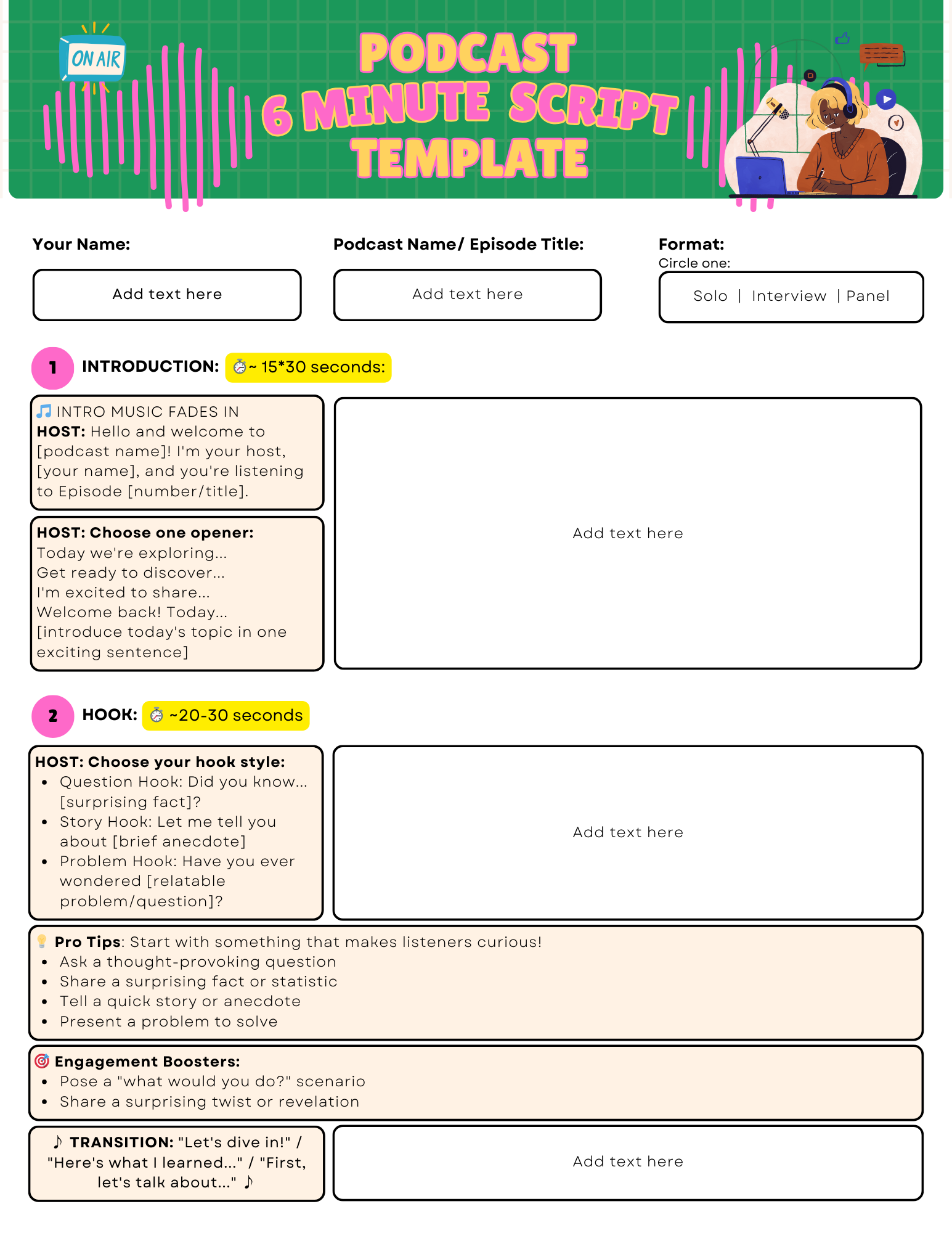
Use 6-minute script template(opens in a new tab or window) to simplify script writing for students
Step 3: Record the podcast
Once the script is ready, students can proceed with recording the podcast by starting with a blank Presentation, Video or Social Media (video) template. The Podcast Recording Guide(opens in a new tab or window) walks through multiple options: record a talking head or voiceover using Canva’s built-in recording features, upload your own files or use AI voiceover for students who feel shy. Students can record themselves asking questions then respond as their character—or partner up for more natural conversation.

Check out the Podcast Recording Guide(opens in a new tab or window) for different options
Step 4: Add finishing touches
Once recording is complete, students polish their podcasts. They design cover artwork that captures their show's spirit—choosing color schemes, fonts, and imagery that represent their story's genre and tone. Students can also add background music from Canva's audio library, trim clips for tighter pacing, and insert title cards or visual elements to enhance the listening experience.

Example podcast cover to match the story
Common challenges and solutions:
- Scripts running too long: Set a 3–5 minute target and have students identify their three most interesting details to feature
- Recording anxiety: Offer the AI voiceover option, or allow partner recordings where students interview each other in character
- Narrative-to-dialogue struggle: Provide sentence starters like "So tell me about..." or "What's it like when..."
Assessment and showcase ideas
Presentation approach:
Host a "Podcast Premiere" where students introduce their episodes with a brief pitch before playing a 60–90 second highlight clip. Alternatively, create a digital listening library that families can access, using the Listening Library whiteboard template from the Podcast in Your Pocket resource(opens in a new tab or window).
Marking rubric:
- Narrative quality and creativity (30%)
- Script adaptation and dialogue flow (25%)
- Production quality and podcast branding (20%)
- Oral communication and delivery (15%)
- Digital literacy and process (10%)
Reflection prompts:
- How did transforming your story into a podcast change how you thought about your characters?
- What was most challenging about recording, and how did you overcome it?
- If you could interview any book character, who would it be and why?
Differentiating this recipe to suit your classroom
To challenge students:
Encourage advanced students to create multi-episode podcast series, develop additional characters for panel-style discussions, or incorporate sound effects and music beds for a more produced feel. They might experiment with documentary-style episodes weaving narration with interview clips, or mentor peers during recording sessions.
To make this activity easier:
Provide a structured script template with fill-in-the-blank sections for the alien interview. Reduce length to 1–2 minutes focusing on three key questions. Pair students for partner podcasts, or use Canva's AI voiceover feature for those uncomfortable recording their own voice.
To flex this recipe for different subject areas:
- History: Students create podcasts interviewing historical figures, transforming biography research into first-person conversations
- Science: Adapt for "expert interview" podcasts where students role-play as scientists explaining ecosystems, space, or the water cycle
- Social Studies: Students podcast as explorers or immigrants from different cultures, bringing primary source research to life
Ready to get started?
Start small by having students transform just one paragraph of existing writing into a brief 60-second podcast segment. This low-stakes introduction lets everyone experience the writing-to-audio process before committing to a full episode.
We'd love to hear how your students' podcasts turn out! Share their podcast experiences by tagging @CanvaEdu on X or posting in the Canva Teachers Community(opens in a new tab or window) on Facebook.
Have your own innovative Canva classroom activity? Submit your recipe(opens in a new tab or window) for a chance to be featured next and inspire educators around the world!

