- How Data Visualization can Empower Students in a Data-Driven World
How Data Visualization can Empower Students in a Data-Driven World
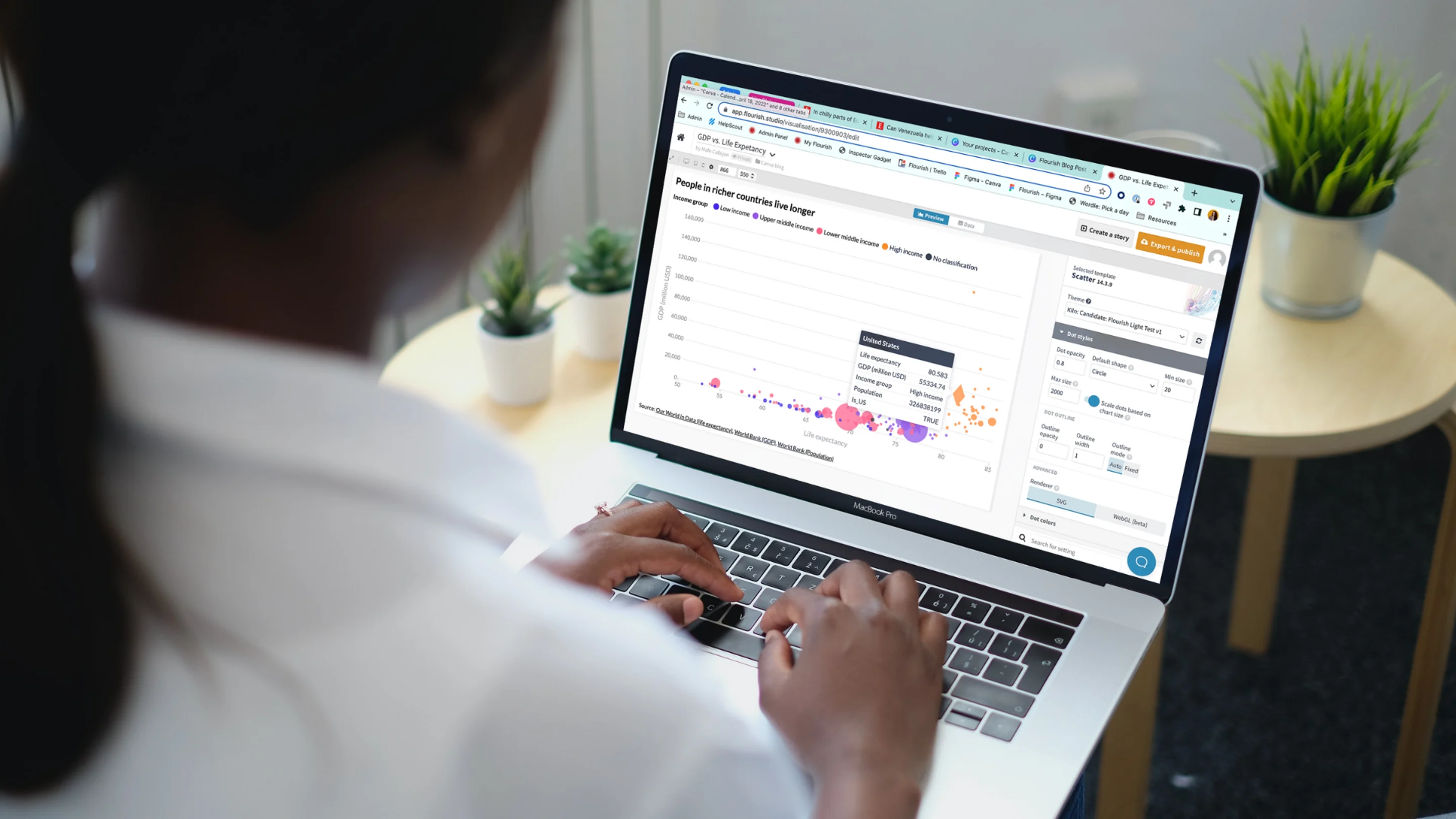
Guest Authors: Luisa Bider, Mafe Callejón and Simona Tselova are part of the Content Team at Flourish, the world’s leading data storytelling platform that enables anyone to create beautiful graphics and interactive stories without coding.
Data is everywhere and it’s becoming increasingly important to empower students to navigate this data-filled world. Have you ever wondered how much digital data we produce? Globally, we generate about 100 billion WhatsApp messages(opens in a new tab or window), 500 million tweets(opens in a new tab or window) and more than 700 thousand hours of YouTube content(opens in a new tab or window) every single day. Putting this into perspective, online content reached a whopping 59 zettabytes(opens in a new tab or window) in 2020 – a unit big enough to fill about a quarter of Manhattan(opens in a new tab or window) with data!
“We create as much information in two days now as we did from the dawn of man through 2003.”
Eric Schmidt, Google CEO (2001-2011)

See an interactive chart about the size of data here(opens in a new tab or window).
Today’s children live in a world almost entirely driven by data. From TV anchors discussing the latest COVID-19 cases to mobile apps showing how many steps we walked or charting the quality of our sleep, data visualization is everywhere. While most students are shown basic line and bar charts in their math classes, the question remains, "how much does the average child actually interpret from a chart?"
Our ability to read, understand, create, and communicate data is defined as data literacy(opens in a new tab or window).The earlier a child obtains these essential skills, the less likely they are to be intimidated by data. Simply put, teaching data literacy skills is key to setting up children for success in the future.
Shapes, pictograms or isotypes help us learn better (Canva Template: Colourful Finding Fractions Maths Worksheet)


What’s data visualization?
In a nutshell, data visualization is a way of visually presenting information. While it makes data easier to comprehend, data visualization helps us detect patterns and trends faster and in a more visually appealing way.
What are the benefits of learning data visualization?
1. Improves learning
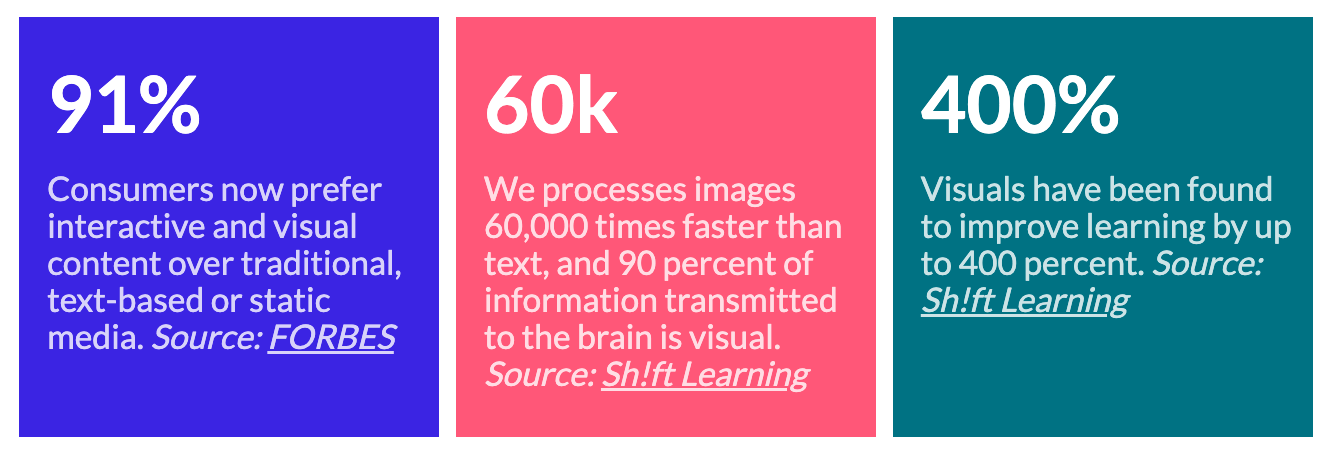
According to the education market research agency, Sh!ft Learning(opens in a new tab or window), visuals have been found to improve learning by up to 400%. The use of graphics, animation and video in the classroom increases student engagement(opens in a new tab or window) and boost students’ motivation to learn. Moreover, further studies(opens in a new tab or window) have shown that visual and participatory learning best enhance our ability to retain information over time.
Almost all information our brains process is visual, so a visual subject like data visualization(opens in a new tab or window) should come naturally for young learners.
2. Teaches children to think critically
Information overload helps misinformation spread wider. Therefore, we should encourage students to think critically and evaluate the evidence, so they learn to form their own conclusions from a young age. Understanding what data is, why it matters and how it affects our decision-making is the first step toward a more data-proficient generation.
3. Prepare children for data-driven workplaces
85% of the jobs that will exist in 2030 haven’t been invented yet, according to Institute for the Future(opens in a new tab or window). We can only speculate what these new roles will entail, but it’s safe to assume that most, if not all, will involve data.
Recent studies show that just over a fifth of 16 to 24-year-olds are data literate – a small percentage that will surely not meet the increasing demand for data scientists(opens in a new tab or window).

As teachers and mentors, we can start empowering young minds by incorporating data visualization into . Not sure where to start? Below, we’ve shared 5 data-related activities for you to use in the classroom!
The basic elements of data visualization
Let’s begin by looking at the data terminology needed to empower and support your students. Data visualization is a visual language and, like any language, it comes with its own alphabet.
Here are some of the most common visual terms that every students should know:
- Position: where an element is located in the chart?
- Orientation: is the element pointing upwards, downwards?
- Size and length: values can be represented through magnitudes
- Shape: different shapes separate different groups or categories.
- Color: different hues can create groups and also convey meaning.
- Value: the saturation of the hue. This is usually used in scales.
- Texture: similar to color and shape, textures can create groups or can highlight certain elements.
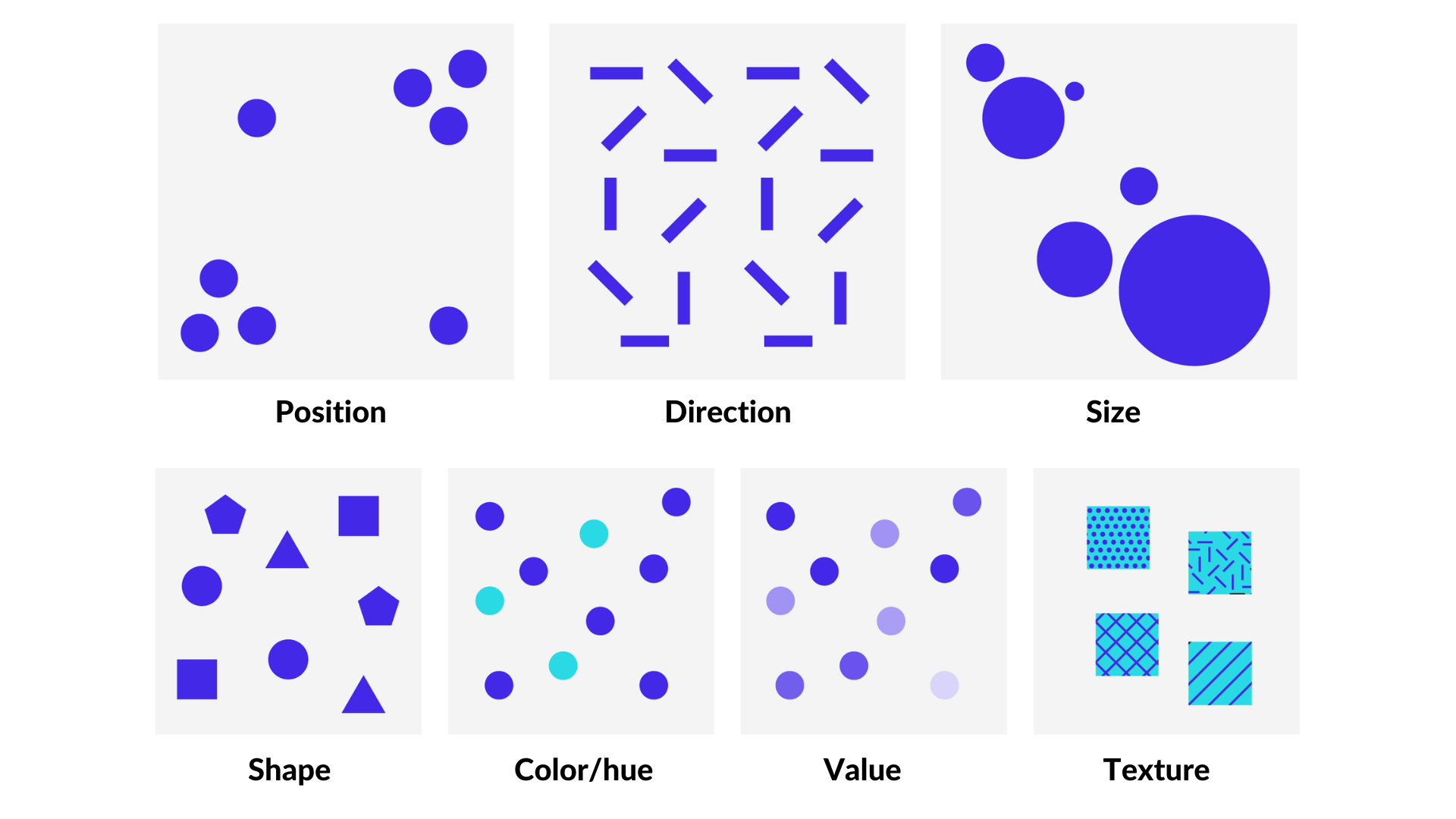
Let’s look at an example to understand these terms better:
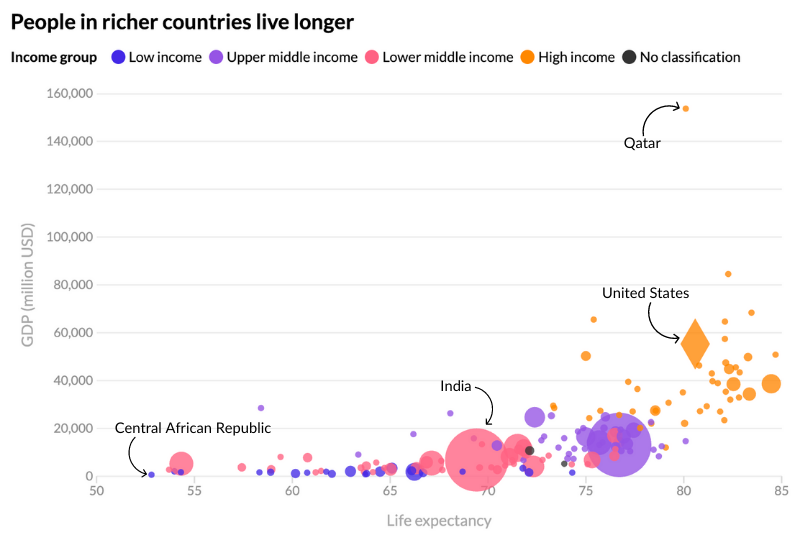
Sources: Our World in Data (life expectancy), World Bank (GDP, population)
This is a scatter plot(opens in a new tab or window),(opens in a new tab or window) a chart type that seeks to show the relationship between two numeric variables represented by the axes. The X axis represents life expectancy while the Y axis represents GDP. The higher the dot, the richer the country. The more to the right, the longer the people in that country are expected to live. Plus, the size of the dot represents the population of each country while the color represents the region based on income. Lastly, the diamond shape highlights the position of the United States.
The overall message in this chart is that people who live in wealthier countries are expected to live longer than people in poorer countries.
It’s important for you and your students to understand how these variables work and how they interact with each other. This will allow you to create more complex visualizations, in the same way vocabulary can help you build more complex sentences.
To learn more about the visual variables and the principles of perception, you can review the work of authors like Alberto Cairo(opens in a new tab or window) and Isabel Meirelles(opens in a new tab or window).
5 activities to get started with data visualization in the classroom
Here are five simple, but effective exercises to help introduce data visualization in your classroom. They’re organized from simple to complex, depending on the level of experience of your students.
Level 1: Understanding grouping and comparisons
This exercise, inspired by Julia Krolik’s article(opens in a new tab or window) in The Nightingale, will help you introduce to your students the ideas of grouping elements together in order to compare them. They will learn the importance of organizing data to answer questions, how to group elements based on common traits, how to compare magnitudes, and how physical variables (like height or length) can relate to numeric variables.
Instructions
1. Give each student a simple data set like a list of fruits or animals and their quantities. You can download an example sheet here(opens in a new tab or window).


2. Ask your students to draw the number of elements in the table by stacking them on top of each other. For example, if there are two apples in the data table, students should draw two apples in their worksheet.
3. Ask your students to identify which group has the least amount of elements and which one contains the most. Ask them to explain the reasoning behind their answer.
4. Alternative: try a similar exercise by providing your students with a series of physical objects (legos, little figurines) and asking them to physically make groups, by stacking them on top of each other. You can ask them to group them by shape, by color or any other variable you can think of.
Level 2: Let’s make a map! What cartography can show us about the world and ourselves
Mapping is a core part of data visualization and it’s the oldest chart type. Maps help us see information in a geographical setting and help us draw conclusions
First, here are some basic things to consider about maps:
- Less is more: maps shouldn’t try to show too much data but just the precise amount
- A descriptive title is a must: a good map starts with a clear title that gives the reader an idea of what they are about to see
- A legend or a key: if a map uses color or symbols to represent information, then a legend that explains to the reader what those elements are is crucial
Here’s an activity to help your students make a map, inspired by Jon Schwabish from PolicyViz(opens in a new tab or window). From it your students will learn how maps work, what legends are and their importance, and how to represent data through maps.
Instructions
1. Ask your students to draw a blueprint of their school. This can be as simple as a rectangle with divisions that represent the classrooms, the cafeteria and the playground
2. After each student has created a map of the school, they’ll need to complete the following tasks:
- Draw a symbol on the places they spend most time. The size of that symbol will depend on the time spent in that place
- Add a different symbol that represents their favorite place in their school
- Add a descriptive title that condenses the essence of the map
- Add a legend that shows the sizes of the symbols
- Add a note that explains that the special symbol for their favorite place means
3. Ask your students to share and explain their work with the rest of the class! Discuss how and why the maps look different
Level 3: Understanding different chart types and when to use them — an introduction to Flourish
The different chart types in data visualization serve different purposes. Understanding the different uses of chart types will help your students think visually, decode visual messages and gain the tools they need to convey complex ideas with data.
The Financial Times’ visual vocabulary(opens in a new tab or window) and Flourish’s webinar(opens in a new tab or window) on the topic are two good sources to understand chart types better. The following activity will teach your students how to identify different chart types and how to select the correct one for their data. This can also be their introduction to the Flourish app.
1. Provide three data sets to the students: one with geographic data (preferably with coordinates), one with time series and one with proportions. Here are some examples of data sources and expected chart types using Flourish:
- Time series data: Mobile phones per 100 people(opens in a new tab or window)
Note: the data sources are linked at the footer of each chart.
Students will build a map with the geographic data set, a line chart with the time series or a bar chart, a synoptic table(opens in a new tab or window) that breaks down ideas for better visualization, and either a pie chart, tree map or stacked chart for the proportions one.
2. Ask students to make visual representations of each data set and explain their reasoning behind choosing each chart type.
Level 4: What does this mean? Interpreting charts “in the wild”
Understanding other people’s charts is as important as making your own. In this activity, your students will have to evaluate charts that have been published in the media or online, they will have to guess what it is representing and evaluate whether it’s a good chart or a misleading one.
Instructions
1. This activity can be done individually or in small groups for students to discuss their answers. Arrange students accordingly.
2. For each chart, do a round of questions and debate. Show your students a picture of the chart without giving them many details, just the basic information necessary for them to interpret the content.
3. The idea is to ask students to describe what they think the chart conveys and whether they think it’s an effective chart or not. Some questions worth asking might include:
- What is the point of this chart?
- If you could give it a title, what would it be?
- Do you think this chart is misleading? Why?
- When do you think this chart was published?
You can use any chart that you want but remember to blur any information that may give your students too many clues. News websites, scientific journals and some specialized websites might be good sources for example charts. Here we provide you with three examples:
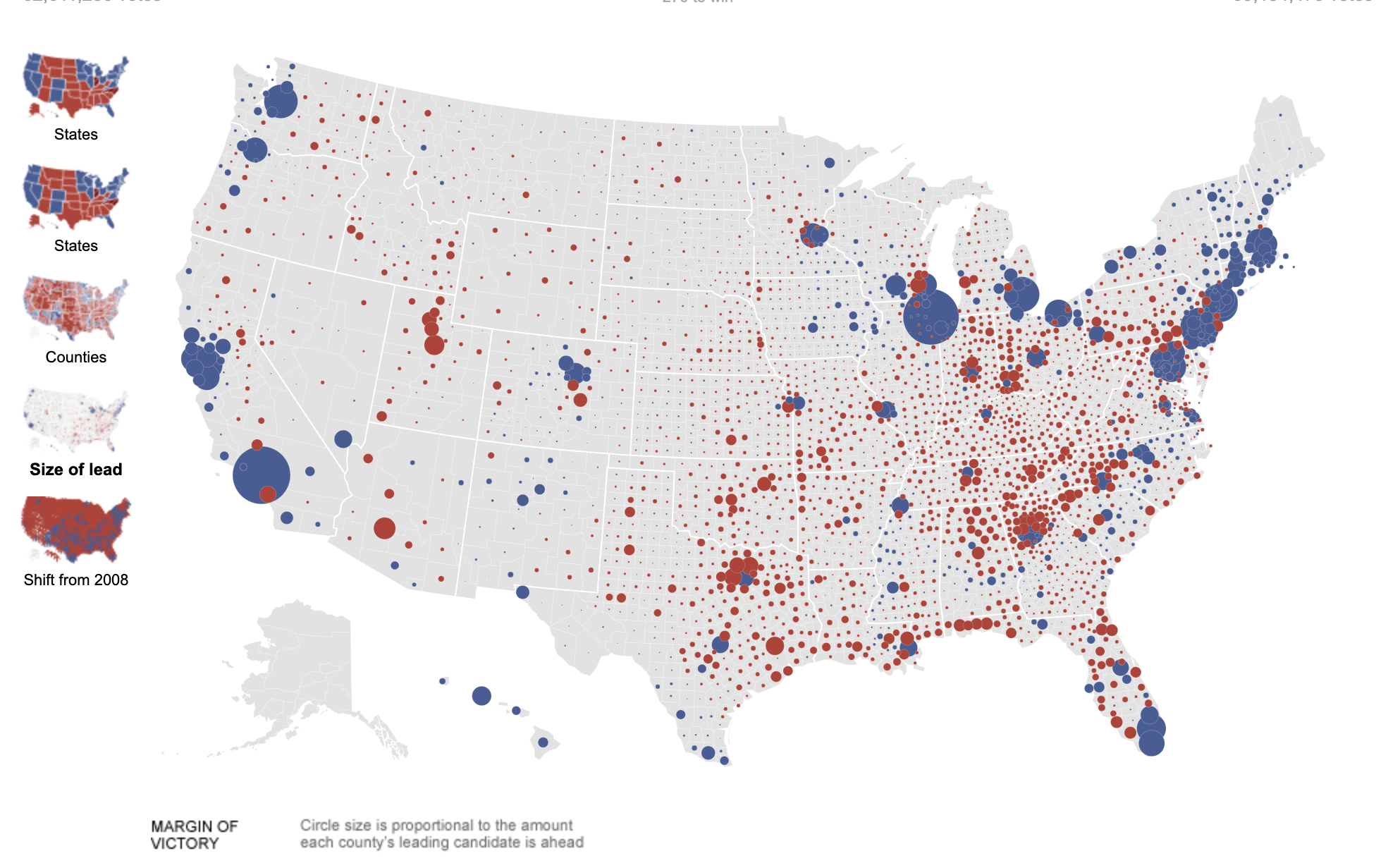
1. Election map from the US 2012 general election (New York Times(opens in a new tab or window)): the idea with this map is to conceal the year of the elections and the result. Students would then have to infer or guess based on what they see in the page. In the map below the bubbles are showing the size of the lead each candidate had by county. Red bubbles reveal favorable votes for the Republican candidate Mitt Romney while blue bubbles show favorable votes for Democrat candidate Barack Obama, who won the elections that year.
2. The number of girls out of primary school worldwide has fallen to an all time low (Information is Beautiful(opens in a new tab or window)): this line chart is showing a downward trend of the number of girls out of primary school worldwide.

3. One example from the New York Time’s “What’s Going On in This Graph?”: The New York Times’ Learning Network(opens in a new tab or window) holds a weekly forum where students can discuss and analyze one chart published in the newspaper that week. This gives a good opportunity to improve their data literacy skills and to connect with other people interested in data visualization. You can select one of the charts they have already featured on their site. These series of slope charts about how people spent their time during the pandemic outside of work and school(opens in a new tab or window) can be an interesting topic of discussion.

Note that the titles of these three charts have been removed for the purpose of the exercise.
Level 5: Draw your own conclusions
Being data literate means being able to interpret, wrangle and visualize data in an effective way. This exercise seeks to test your students’ abilities to go from a raw dataset to a final chart and to critically make decisions along the way. Your students will learn how to interpret and select data for visualizations, as well as practicing their charting skills. Through this exercise, they will learn the differences between tables and charts and will also learn to evaluate their own charts and their peers’ to determine how effective they are.
Instructions
1. This activity might work better if students are working in groups so they can discuss the answers, but can be done individually.
2. Give an identical dataset to each student/group and explain the basic content of the data. Here we provide a dataset that contains data on energy consumption by region between 1965 and 2020 by Our World in Data(opens in a new tab or window). The dataset(opens in a new tab or window) contains a column with the years and then each column represents a world region containing total consumption per year.
3. Working just with the tabular form of the data, ask your students the following questions:
- Which region showed the highest energy consumption in 2020?
- Which region showed the highest energy consumption in 1965?
- Which region saw the biggest increase in energy consumption overall?
4. Now, ask the students to visualize this data in the best way they see fit. Then, ask them the following questions:
- What steps did you follow to visualize that data?
- Why did you decide to visualize it in that way?
- Do you think this is an effective visualization? Why?
- Did you discover anything new from the data by viewing it in this way?
5. Ask the same questions again. Are the answers any different? Did they reach conclusions more quickly with the data in tabular format or with the chart?
Here are a few examples of charts they could make with the data(opens in a new tab or window):
Stacked area chart (%) to show the change of the proportion over time

See the interactive version here(opens in a new tab or window).
Finding data
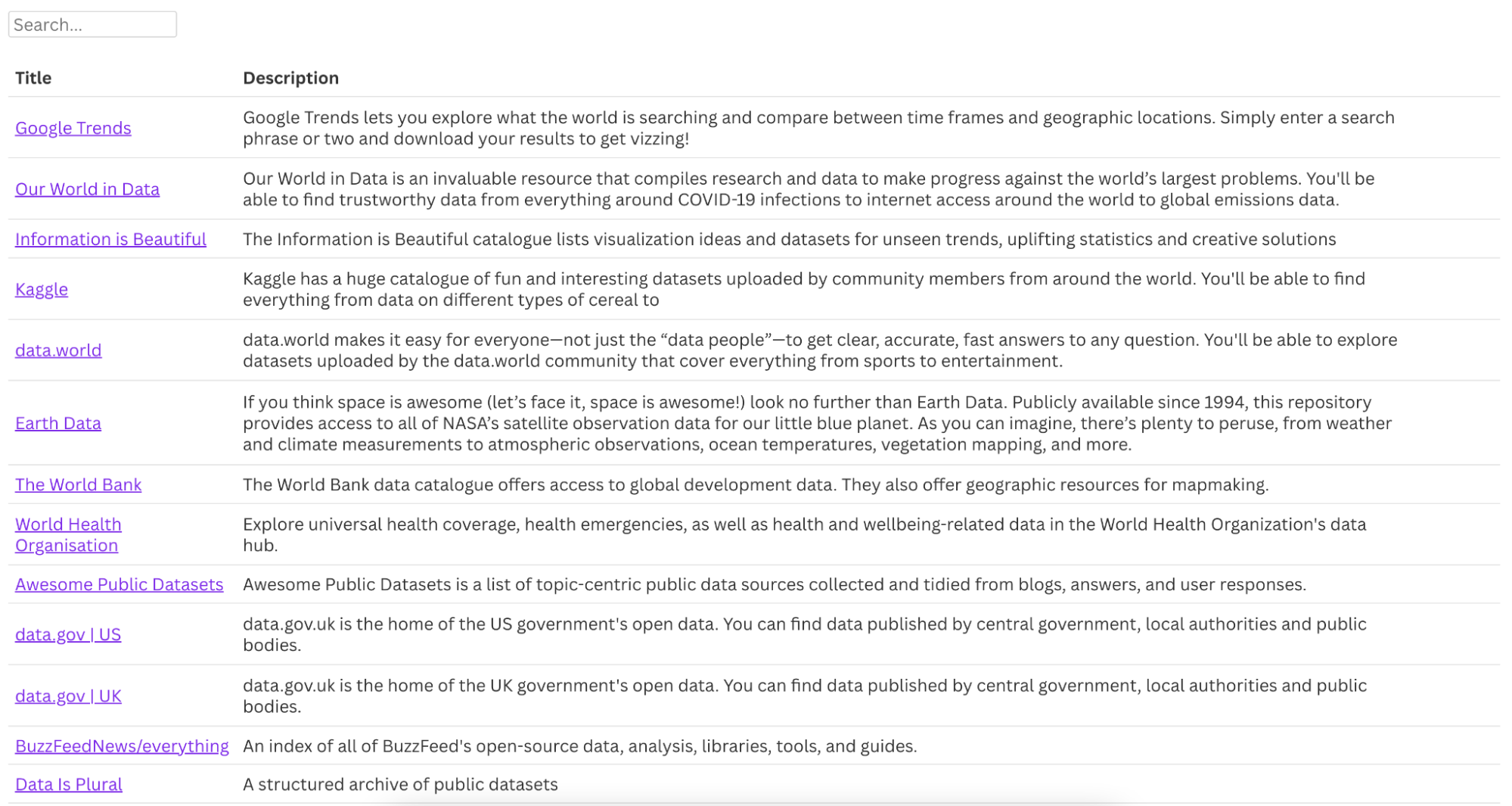
To get started with dataviz activities in your classroom, there are loads of free resources full of interesting datasets. We’ve included a list of sources below.
Getting started with data visualization in Canva
Earlier this year, Canva joined forces with leading data storytelling platform Flourish(opens in a new tab or window). The Flourish platform enables anyone to distill complex data into interactive and engaging visualizations. Anyone can get started with Flourish for free and start creating stunning visualizations and stories. You can create and publish visualizations directly within Flourish, or pull them through to Canva with a single click using the Flourish app under the “More” tab. Find the app in the Canva app store and connect your Flourish account to get started!

Learn more about the Flourish app in this help doc(opens in a new tab or window).

Written by
Luisa Bider, Mafe Callejón, Simona Tselova
