Canva home

Meet your AI creative partner

10m

Beginner

We’ll start smart with three basics that make everything else in this course click.

Meet your AI creative partner

10m

Beginner

We’ll start smart with three basics that make everything else in this course click.


What you’ll learn

  • Get to know Canva AI
  • Communicate with AI effectively
  • Prompt to get the best results

Your journey starts here

Here's a quick tour of how the course works.

Quick tip:

  • This is your sandbox: describe what you're imagining, and Canva AI helps you turn it into something real.
  • There's no wrong way to start, so play around and see where it takes you.


How does Canva AI work?

So that's how the course works. Now, let's look at what’s possible when you partner with Canva AI.

Pretty incredible, right? And it all happens here in Canva, where you're already working.


Prompt the results you imagined

Now let’s learn how to talk to Canva AI.

Quick tip:

  • There's no limit to what you can create. These prompting tips work for whatever you're building with AI.
  • A good prompt is like a recipe: subject, action, setting, aesthetic, and any other details you can throw in.
  • Not quite what you were imagining? No rewrite needed, just tell your creative partner what to tweak (e.g. "warm up the colours").


How to improve any output

Let’s look at a direct comparison between a good prompt and a... not so good one.

Think of prompting like a conversation. Share your idea clearly – then see if it lands. If not? Add more detail and give helpful references. The back-and-forth builds the shared context you need to bring your imagination to life.


The formula to remember

Save the cheatsheet below to keep perfect prompts at your fingertips.
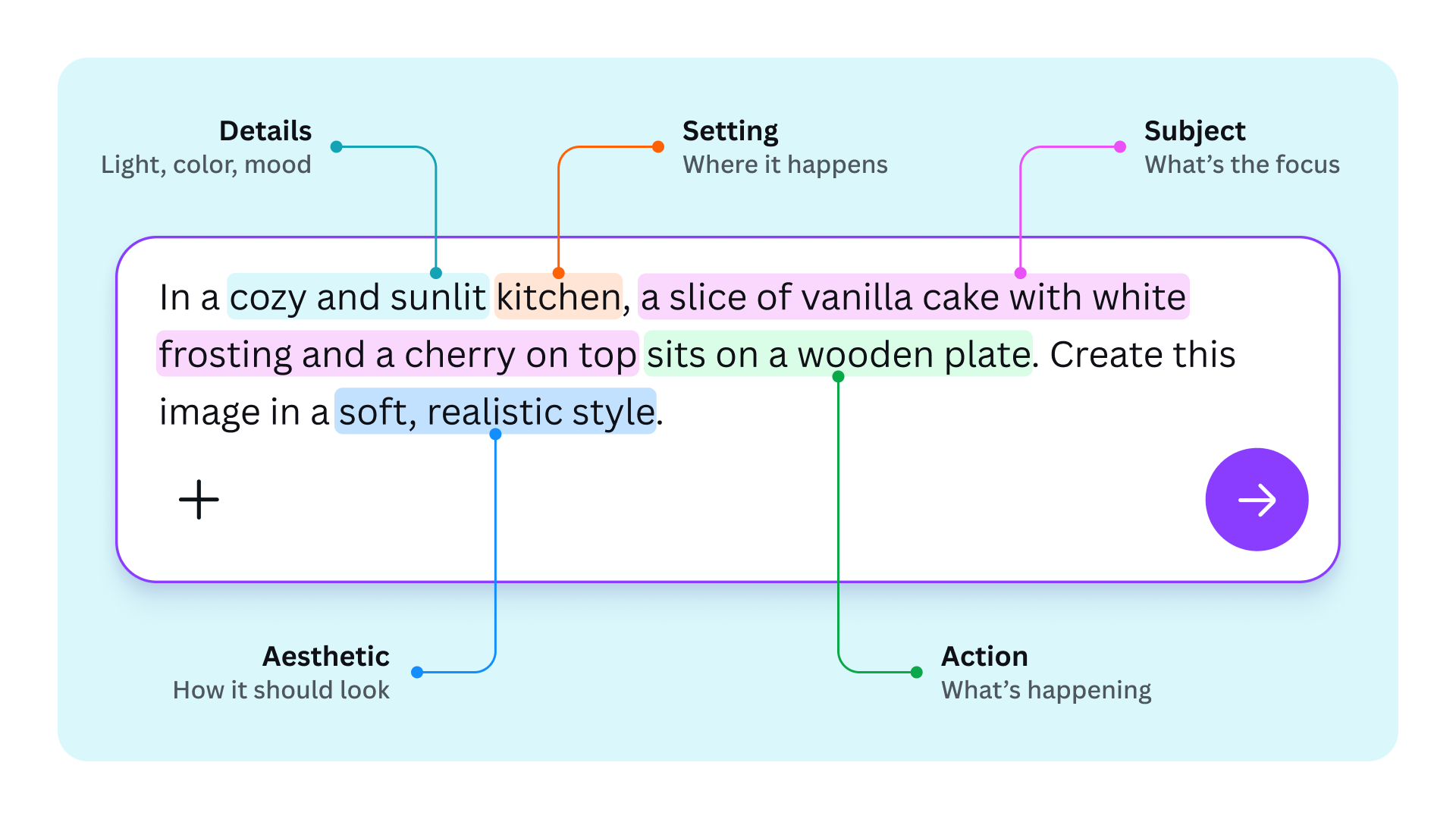
Prompt like a Pro framework

Note that you don’t need every element every time, or in this order – but the more specific your prompt, the closer the result matches what you imagined.

Quick tip:

Lesson 1? Done! Play around with Canva AI for yourself, or select Finish lesson to head to Lesson 2.


Guides you might like

Guides you might like

Guide
Navigating Canva's homepage

Navigating Canva's homepage

Navigating Canva's homepage

5m

Beginner

Guide
Customizing templates

Customizing templates

Customizing templates

10m

Beginner

Guide
Uploading and editing photos

Uploading and editing photos

Uploading and editing photos

5m

Beginner

Guide
Exploring the Element Library

Exploring the Element Library

Exploring the Element Library

10m

Beginner

Guide
Text and the Font Library

Text and the Font Library

Text and the Font Library

5m

Beginner

Guide
Sharing, collaborating and downloading

Sharing, collaborating and downloading

Sharing, collaborating and downloading

5m

Beginner

Guide
Exploring the Visual Suite

Exploring the Visual Suite

Exploring the Visual Suite

9m

Beginner

Guide
Navigating your Canva Education homepage

Navigating your Canva Education homepage

Navigating your Canva Education homepage

4m

Beginner