- Grammar Checker
Free AI Grammar Checker
Polish your prose with the free AI-powered grammar checker on Canva. With just a few clicks, let Magic Write™ clean up any errors in your writing so you can confidently present your work to the world.
How to use the free online grammar checker
Enter your text
Open Canva Docs and type in or copy-paste your writing in the blank page.
Check grammar
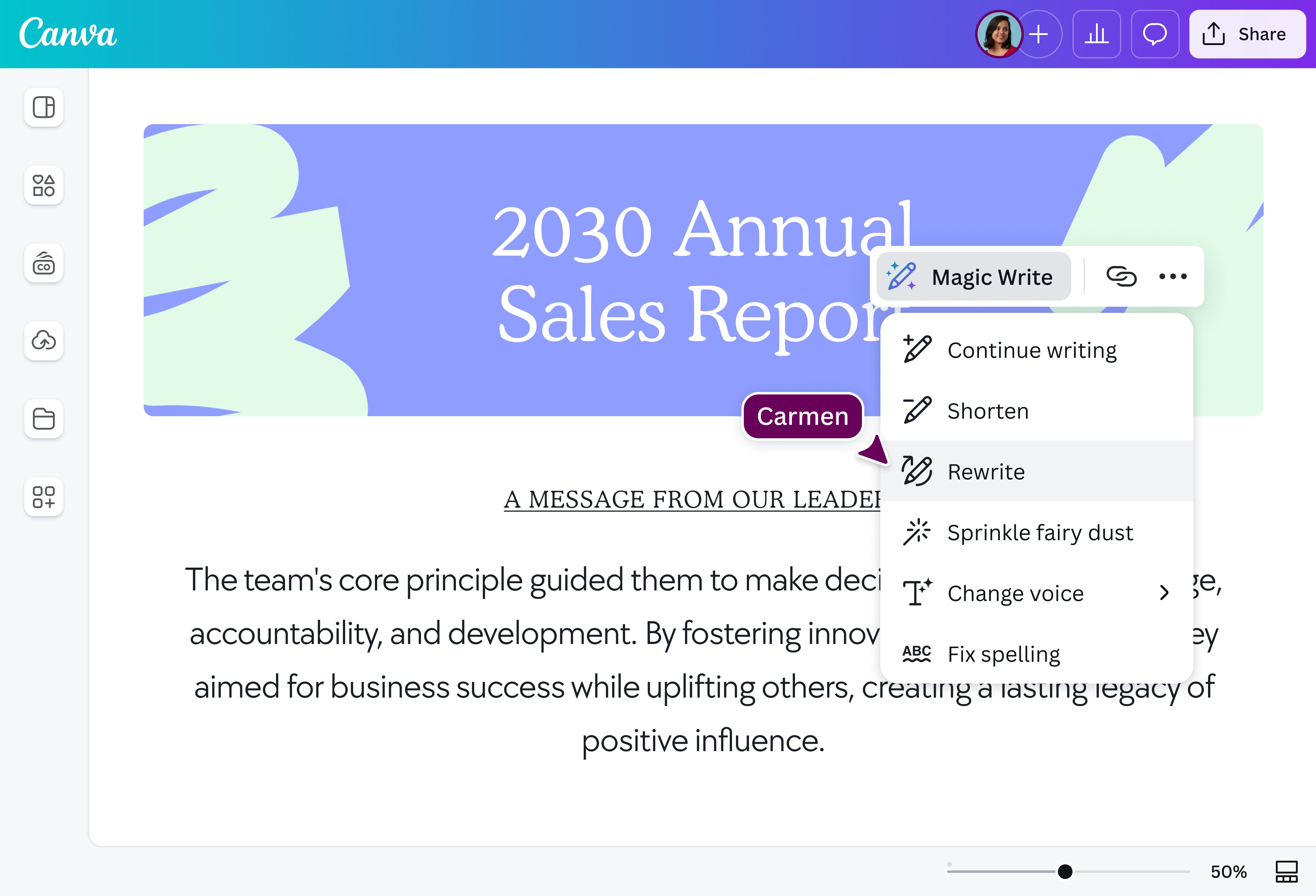
Highlight your text, select “Magic Write,” and choose “Fix spelling” to scan and correct errors.
Download or share
Finally, save your document in your preferred format or share it directly from Canva.
Power up your writing with AI

Don’t let the fear of making mistakes interrupt your flow with Canva’s Magic Write(opens in a new tab or window). Our powerful grammar checker tool instantly fixes spelling, grammar, or punctuation errors(opens in a new tab or window) while you write on Canva Docs(opens in a new tab or window). Craft great content faster, whether it's a school essay, research article, business report, or blog post, and cut your editing time in half while you’re at it.
Create and collaborate anytime, anywhere

Make corrections to your group report or polish work memos at the last minute, no matter what device you’re on. Whether you’re working from home on your desktop or on the road via mobile or tablet, access the grammar checker online for free on any device and easily collaborate with your team. No more back-and-forth emails or messages—just smooth, productive teamwork.
Enjoy more possibilities for your prose

Make the most of Magic Write and a host of other AI-powered tools. Summarize text into bite-sized content or reword your copy with the Paraphrase tool. You can also turn rough ideas into detailed paragraphs(opens in a new tab or window) or inspire your next page-turner with a polished story(opens in a new tab or window). Easily incorporate your writing into your infographic, social media post(opens in a new tab or window), ornewsletter(opens in a new tab or window), and create stunning text effects(opens in a new tab or window) and do it all and more with Canva.
How to use the AI grammar checker

Frequently Asked Questions
- The grammar and sentence checker is a feature within Magic Write™, our AI content generation tool powered by OpenAI. It has been trained with data on the public internet up to mid-2021 and uses this data to make predictions and generate text free from grammatical errors.
- Our online grammar checker is free for anyone using our design platform. With a free account, you can enjoy 50 lifetime uses in total, while those with Pro, Teams, or NFP accounts are granted 500 uses per user per month.
- Absolutely! You can run your emails, social media captions, or any piece of content through our grammar corrector. Type or copy-paste your text from a source, and our AI-powered tool will spot and clean up your grammar or spelling mistakes in seconds.
- Definitely! Our tool is a grammar and punctuation checker where AI can automatically insert or remove periods, commas, apostrophes, and more. It’s an all-in-one AI writing assistant, so you can also reword content to match your brand voice or generate entirely new short-form or long-form content.
You can write correct English by paying close attention to your spelling and grammar. Studying grammar rule books and style guides is an excellent way to learn best practices. You can also read fiction and nonfiction books in the language if you find rule books tedious.
English is quite a complex language with plenty of rules, so it will take a lot of work to improve your writing in English. However, if you don’t have the time to go about it the old-fashioned way, an online grammar checker tool like ours can help you improve faster.

@navneet4