- Rewording Tool
Express every idea perfectly with the best AI rewording tool
Never struggle for words again with Canva’s Magic Write™ as your rewording tool. Effortlessly reword drafts, emails, or articles to make your writing clearer, smoother, and more compelling.
How to reword text with AI
Enter your text
Open a new or existing doc or design, then type or paste your content onto the page.
Reword text with AI
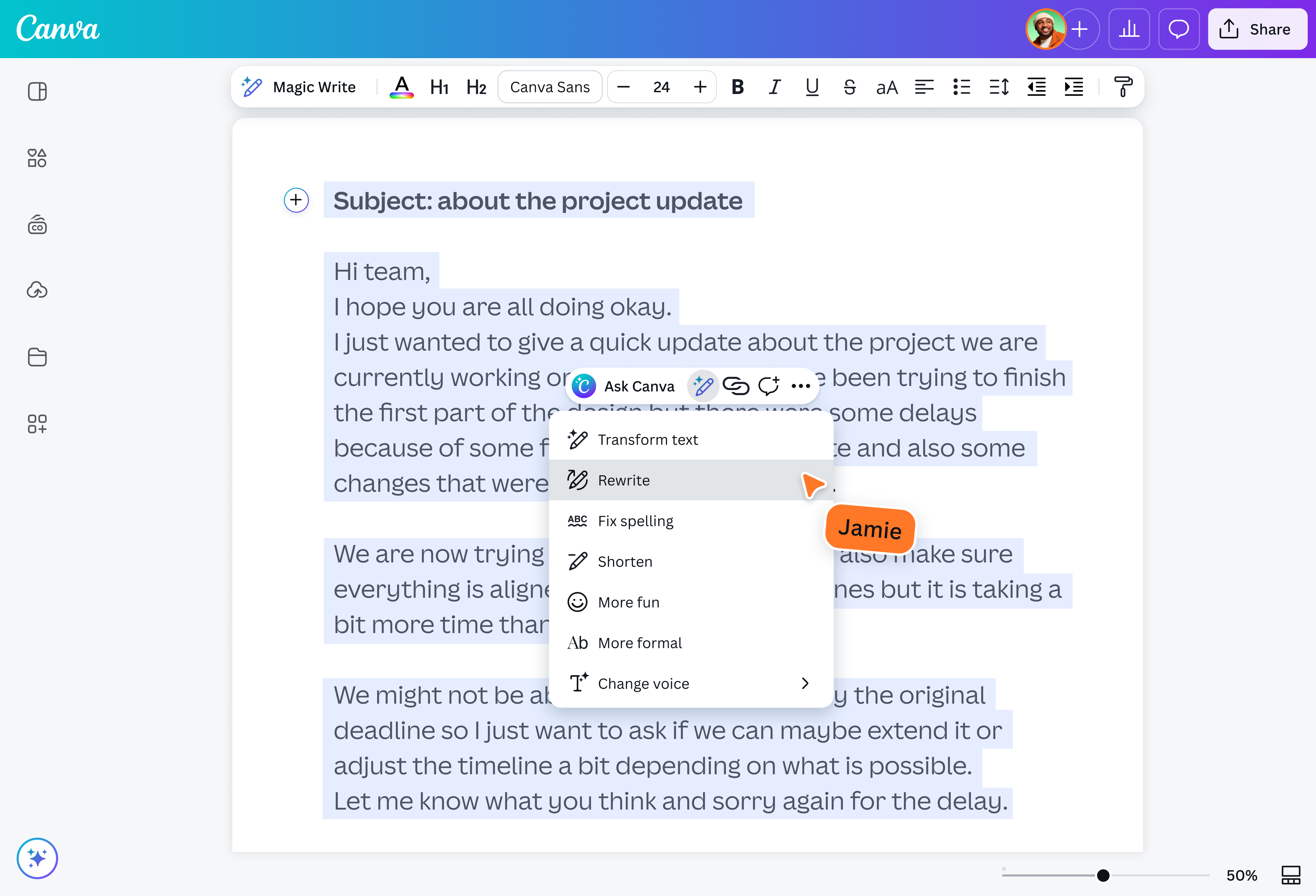
Highlight your text, tap “Magic Write,” and choose “Rewrite” to generate a more natural, easy-to-read version.
Download or share
Finally, download your updated doc or design, or share it directly from Canva.
Say it right, every time

Say things anew while keeping your meaning intact. Canva's Magic Write(opens in a new tab or window) lets you swap words and phrases for sharper synonyms that refine your writing and make every message land. Tighten email subject lines, refresh blog titles(opens in a new tab or window), or repurpose webinar notes, all in just a few clicks. Use our AI rewording tool to tweak a word or your entire message, and keep going until everything sounds just right.
Better wording for every writer

Our rewording AI tool helps you explore fresh ways to express your ideas, whether you write for clicks, clients, or colleagues. Summarize(opens in a new tab or window) key points from reports, craft compelling Instagram captions(opens in a new tab or window) or LinkedIn posts, or write emails(opens in a new tab or window) and messages that sound natural and polished. Whether a beginner or seasoned writer, level up your vocabulary and always arrive at the perfect word with Magic Write.
All you need to keep your words flowing

Done rewording your sentences and phrases? Make the most of Magic Write and give your work a final once-over without switching apps. Run your copy through our spelling(opens in a new tab or window) and grammar checker(opens in a new tab or window) to catch typos before publishing, or enter a prompt to edit your text in bulk. More than just a reworder, Magic Write helps you clean up, refine, and perfect your writing, so it’s always ready for your audience.
Write uninterrupted, anywhere

Keep the momentum going, wherever you work. Access our rewording tool on desktop or mobile, whether at your desk or on the go. Use the same tools and features to seamlessly edit articles, docs(opens in a new tab or window), and presentations(opens in a new tab or window) across devices. Got more thoughts brewing? Jump into a whiteboard(opens in a new tab or window) and enjoy infinite space to collaborate with your team in real time. With Canva, nothing gets in the way of your next idea.
How to use the AI rewording tool

Frequently asked questions
- A rewording tool uses AI to rewrite text using synonyms and alternative phrasing while preserving your original meaning. It works by analyzing your sentence, understanding its context, and replacing words or restructuring phrases to improve clarity, tone, and flow. The result is text that reads more naturally and better suits your intended audience.
- Yes, our reworder is part of Magic Write, our AI-powered writing tool, and is available for free with fair-use limits. Free plan users get access to core Magic Write features, including the AI rewording tool. If you need higher usage limits or additional tools like Brand Voice, you can upgrade to a paid plan such as Pro, Teams, or Enterprise.
Yes, our AI rewording tool can help finesse the tone of your writing. When you tap the pencil icon to reword a sentence, you’ll see options for More fun and More formal in the drop-down menu. Choose either one to receive an appropriate substitute wording for your original text.
While these terms are often used interchangeably, each has a slightly different meaning:
- Paraphrasing means expressing someone else’s idea in your own words while keeping the original meaning.
- Rewording (or rephrasing) involves making small changes to wording or sentence structure without changing the message.
- Rewriting involves making more substantial changes, such as adjusting tone, reorganizing content, or refining ideas to improve clarity and impact.
- No. While Magic Write is a great tool for exploring different sentence structures and overcoming writer’s block, it's disabled by default on Education accounts to align with global classroom standards. We encourage students to focus on developing their own original voice!
- No, using a rewording tool isn’t considered cheating when used responsibly. It can help you refine your wording and express ideas more clearly while preserving their original meaning. However, if you’re reworking content from a source, be sure to follow the guidelines set by your institution and always credit the original author to avoid plagiarism.
Use our rewording tool as a creative partner to refine your ideas, improve clarity, and adjust your tone for different audiences. It can help tighten your phrasing and sharpen your content, but it should never be used to rewrite copyrighted material or bypass academic integrity policies.
Only submit content you own or have the right to edit, and always cite your sources while following the AI usage guidelines set by your school or workplace.
Our AI rewording tool is powerful but has a few limitations:
- It only uses data and information up to mid-2021, which means generated text may not reflect recent events, research, or developments. Always verify information from an authoritative source before publishing or submitting your content.
- It only works with the text and instructions you enter or use in your document. The more context and detail you provide, the better your results will be.
- It has a 1,500-word input limit and an around 2,000-word output limit, which means generated text might be cut off mid-sentence.
Always review AI-generated content to ensure it's accurate, complete, and aligned with your intent.

@mahimagirdhar