5 ways to unlock your visual taste
20m
Beginner
How to tap into your unique taste and create with a point of view
5 ways to unlock your visual taste
20m
Beginner
How to tap into your unique taste and create with a point of view
What you’ll learn
- Everyone has taste – that’s a fact.
- When you learn to tap into your visual taste, you can bring your own point of view to any project and become more confident in your creative decisions.
- To start any project inspired, start collecting what you’re drawn to – then look for the patterns that reveal your taste. Follow the 5 steps in this guide for anything you’re creating.

Introduction
You’ve got taste – you’ve been collecting it your whole life. Taste helps us turn a niggling thought into a brilliant idea, go from gut feeling to clear creative decision, and get our imagination out of our heads and onto the page. But it doesn’t just belong to ‘creative’ types. Taste is built from everything you've seen, made, loved, and second-guessed. And when you learn to tap into it, it becomes your superpower for bringing anything you can imagine to life. Because no one knows your imagination quite like you. So whether you just want to play around with uncovering your taste or have an idea you’re workshopping, start here, go on the journey with us in the video below, and then jump into the activity. Your taste awaits.
What even is taste?
Our taste is made up of our interests, what we’re drawn to, what feels “just right.” It influences everything from what we choose when we open the fridge, the hobbies we take up, the clothes we wear – down to the design we choose for a birthday card. We use our taste so much every day that it feels second nature. But it’s actually shaped by everything we’ve ever experienced, noticed, or been exposed to. It’s our own personal barometer of what works for us. But when it comes to creative work – we don’t always bring the same confidence. The good news is you can build your visual taste the same way you built your taste in everyday life: By noticing what you’re drawn to, experimenting as you go, and then learning from the experiences you pick up along the way. Understanding your visual taste is the first step to creating with confidence. By understanding what you like and dislike and why – you start to develop a visual vocabulary that helps you shape an idea, understand what works together and what doesn’t, and make the best creative choices for your project. And from there: you can more confidently bring your point of view to any project to create work that truly stands out.
Start with a mood board
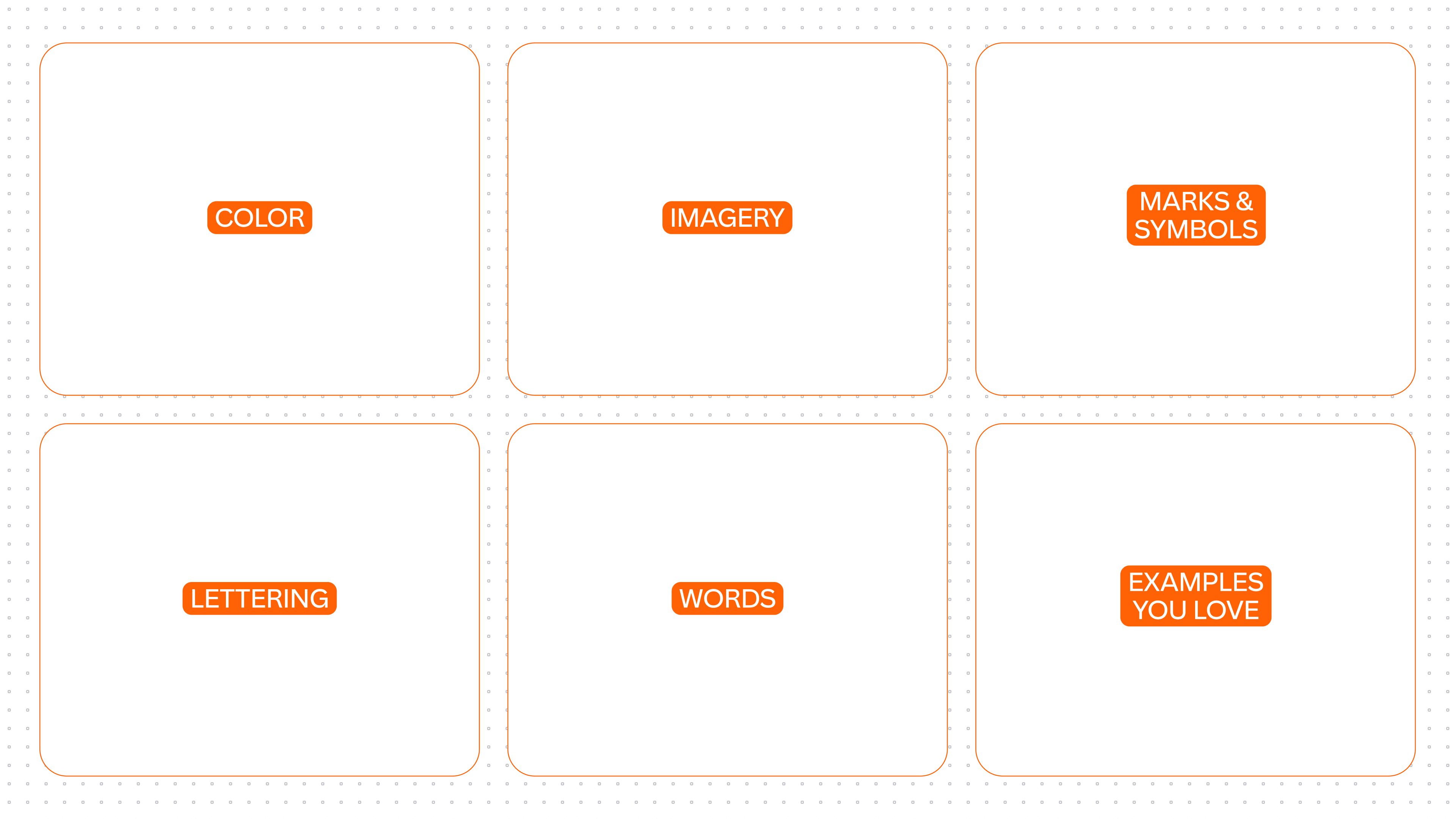
Mood boarding isn’t just a nice-to-have: the process of collecting and laying out inspiration helps you take an idea, explore how it could come to life, and move forward with a clearer direction. Which is why it’s an essential step, whatever you’re bringing to life. Rather than starting from a blank page, we’ve created a guided mood board with categories to help you: color, words, imagery, lettering, marks and symbols, and examples you love. As you go – add any more labels you need for your idea: layouts, effects, motion, you name it. Your mood board doubles as your helpful reminder to notice inspiration and file it away: take a photo or a video, drop in a sticky, take a screenshot, record a voice note, and drop them in as you go. How to mood board:
Jump into your personal taste mood board here to get started.
Look at the world around you
You don’t have to look far for inspiration. Start by looking around you – on your way to work, in the supermarket aisle, while you’re taking the dog for a walk. Use the mood board categories as a guide for what to tune in to. It could be anything at all: the color of a bus, the lettering on a box of pasta, the pattern on the side of a building, the way the sunlight hits the park in the late afternoon. Don’t overthink what you include. Be open to anything, even if it seems completely unrelated to the project you’re working on. This step is about capturing what naturally stands out to you – the further away it is from your idea, the more surprising and interesting your board gets.
Look at things you love

Your personal belongings are the clearest signal of your taste and a great place to go looking for clues. What do you reach for without even thinking: Is there a mug you always use, a jacket, a color you can never say no to, something you can’t stop collecting (plushies stans we see you)? Maybe your phone is full of screenshots of tiles or you can’t stop sending a certain creator’s videos to a friend. What is it about these things that has you hooked? Pop it on the mood board, write yourself a sticky note explaining why. Note anything that comes to mind, don’t worry about having the “right words”; what matters here is that the words are your own, so we can start to find the words to express your taste.
Look at the world of your idea
Now that you've started wide, go deeper by exploring the world of your idea. Maybe you're starting a social club, redesigning your website, or creating your own video. Take a look at how other people in the space promote themselves online, lay out their visuals, or tell their story. Go online, visit locations, chat to someone in the space you’re interested in. If you’re heading online: Give yourself a timer of up to 30 minutes, so you don't get stuck in a rabbit hole. A quick lay of the land is what you're after, not a dive so deep it’s hard to surface from. Take note of what you feel drawn to and pop it on the mood board — the idea isn't to copy, it's to get curious and take cues that help you form your own ideas. Think of this as a sense-check on your own instincts against what's already out there.
Not sure where to start? Ask Canva AI to help with your research – without even leaving your mood board. Try something like – "Show me a few examples of community birding groups and how they present themselves online" – and watch the results appear.
Spot the patterns
And, you’ve made it! Now that you’ve collected different types of inspiration, step back and take a look at your mood board as a whole. What’s standing out? Is there something that kept showing up? What do your references have in common? Maybe the colors are leaning into blues and greens, the typefaces you’re drawn to are all squiggly and handwritten, or the imagery you’ve collected all has this hazy, candid feel. These aren’t coincidences, they’re patterns – proof that your taste has been guiding you this whole time. And now, you can clearly see for yourself not just what you're drawn to visually, but how to keep going with your vision.
Here's where this takes you
The next step is to use these visual patterns as the starting point for your idea – so you can narrow down to a clear direction and start creating. How, you ask? We’ve got you – click through to follow these 5 steps to create anything with taste – and let’s finish this project together.
Key skills
Featured in these lessons
Share
Last updated 15 Sep, 2026