Learn about Canva's upload formats and requirements. See how we use your content in our Privacy Policy.
Convert any image to high resolution online for free. Use Upscale on Canva to quickly upscale your pictures, making them more visually appealing for web and print.
How to convert a picture into HD quality
Upload your image
Select the “Upload your image” button or easily drag and drop your files into the section.
Edit your image
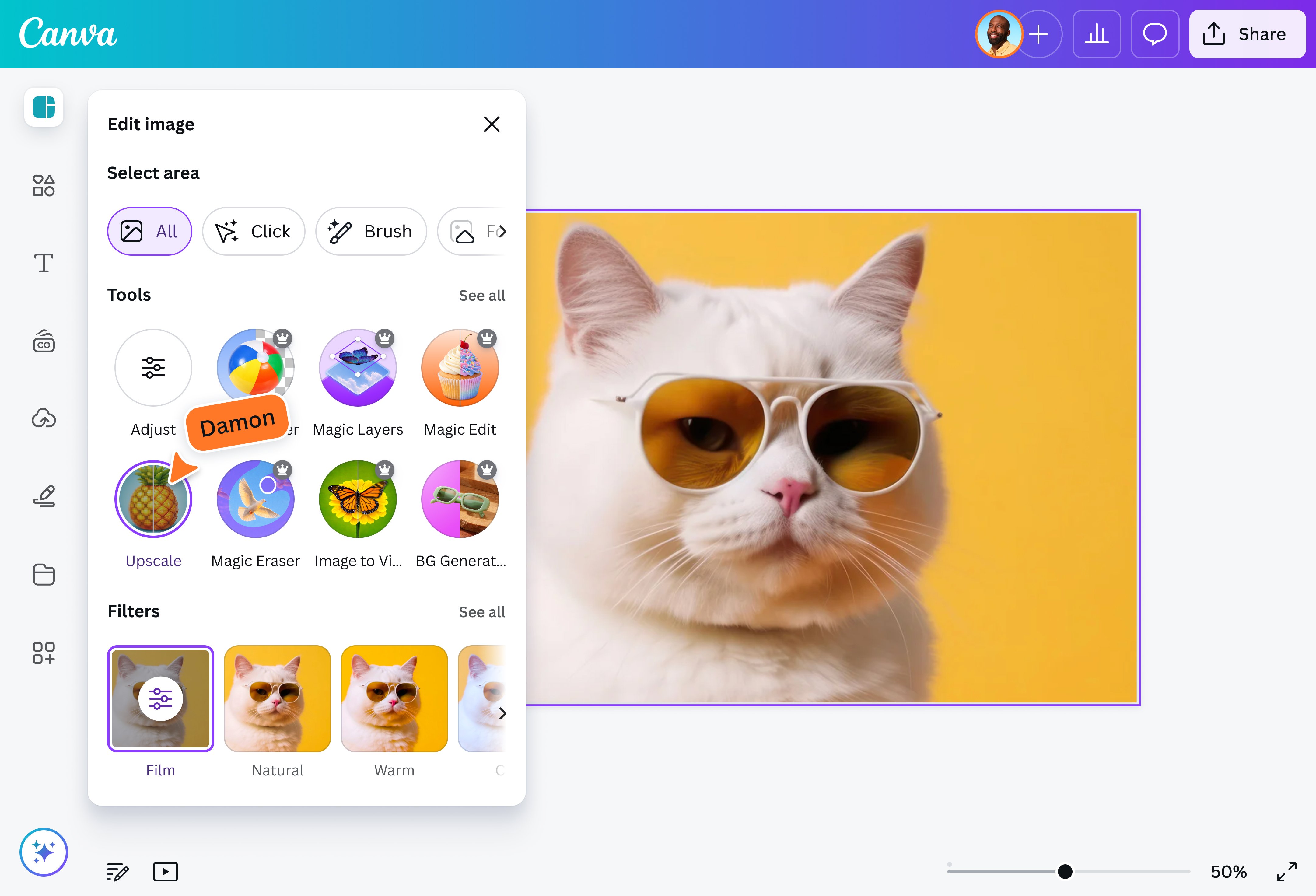
Make some quick touch-ups on your image using “Upscale” in our beginner-friendly editor.
Download your image
Finally, download your photo for free as a high-resolution JPG or PNG file.
Fast HD photo converter
Instantly turn blurry, low-res images into stunning high-resolution with AI. Upload any photo, and Canva’s Upscale will enhance the quality of your picture in a few seconds, no design skills or complicated tools needed. Do away with lackluster shots and make your content stand out on any device or screen. Get brilliant visuals for your ads, social media posts, and personal projects for free on Canva.
Striking visuals across projects
Take your projects to the next level by including high-resolution images converted using AI with Upscale, Canva’s HD photo converter. Maintain a polished and professional look across social media with high-resolution visuals. Impress audiences with detailed prints and portfolios. Finally, preserve memories with ease by improving old, low-res pictures and restoring them to stunning high definition.
You can use our high-resolution converter on desktop or mobile devices. Upload your image via the desktop app or a web browser, or download our apps for iOS or Android on your device. Then, click on your image and choose “Edit” in the floating toolbar. Under Tools, select “Upscale” and watch it enhance your photo in seconds.
Upscaling an image increases its resolution and size, making it look larger and often clearer. While it doesn't automatically improve the original quality, our HD photo converter uses AI to refine details and reduce blurriness, giving your photos a more vibrant look. High-resolution image converters can boost the appearance of your pictures, especially if you start with a good-quality original.
Enhancing your images has plenty of benefits. It makes them clearer and more detailed, producing a better viewing experience. Having higher-resolution images also makes it easier to edit the photos and produce sharp and vibrant print products.
@canva is such a life changing tool! One of the most well thought out websites I've ever seen. I use it to showcase my work with the community and it never ceases to amaze me! Kudos for all the love and effort you've put into its development! #canvadesigns
@mahimagirdhar
I don’t know where I was without @canva They have absolutely great graphics for any social media platform. Whether it be a YouTube thumbnail, an Instagram Post or whatever you want to create. Let @canva make the design process easier for you.
@IGchef_andrewb
@canva is an incredible app for designing pretty much anything you need! A huge selection of templates, fonts and colours; endless choices at the tip of your fingers; easy editing and sending/sharing. Best app I’ve used for a long time. If you haven’t tried it... try it!
@SpotOnDomain
@canva is simply outstanding as a tool to create designs. Using Canva is such a seamless experience that once you sit down to design, you don't feel like getting up. It's addictive and useful. Keep going Canva. I use Canva every day – I couldn’t do my job without it. The ability to style logos is my favorite feature.
@navneet4
Omg I love you guys! Thanks for making it so easy for me to use your templates. There’s so many selections and your site and app are very easy to use and navigate !!! 🥇💓💓💓💓💓💓