- Canva Enterprise: What makes it different to Pro and Business?
Canva Enterprise: What makes it different to Pro and Business?

Updated by Oct 2026
Canva is an end-to-end visual communication platform, designed for all kinds of work. From social media posts and presentations to marketing campaigns and brand assets, Canva gives you the right tools(opens in a new tab or window) to create professional content—whether you're a solo creator, a small business, or a large enterprise.
Why we offer different plans
As your needs grow, so should your tools. That's why we've designed three distinct plans to match where you are in your journey:
- Canva Pro(opens in a new tab or window) powers individual creators who want professional design capabilities
- Canva Business(opens in a new tab or window) equips small businesses with smarter marketing insights and robust brand management capabilities—giving even teams of one the power to create, market, and grow like the world's leading brands
- Canva Enterprise(opens in a new tab or window) helps marketing teams create and manage content without the usual bottlenecks, bringing brand control, creative agility, and collaboration into one platform
Each plan builds on the previous one, adding capabilities to support your growth. Whether you're comparing all three or trying to decide between two, this guide breaks down the differences so you can choose confidently.
In this guide
What is Canva Pro?
Who is it for? Canva Pro is for individual creators and solo business owners. Only one person can hold a Canva Pro subscription.
How much does it cost? This subscription incurs a flat monthly fee of US$12/month per person billed yearly (US$144/year), or US$18 month-to-month. Prices shown are for the US; for your region, see canva.com/pricing(opens in a new tab or window). You can try Canva Pro for free with a 30-day trial.
This plan makes professional design easy for individuals and small business owners. Packed with powerful design features, unlimited premium content, a Brand Kit and AI-powered tools, Canva Pro(opens in a new tab or window) is perfect for a one-person powerhouse looking to save time.
Here’s how:
Everything in the free plan, plus:
- Unlimited premium content: Craft high-quality content across all your channels with unlimited access to 100+ million photos, templates, graphics, and videos(opens in a new tab or window).
- Build and scale your brand: Easily apply your brand to any design with up to 5 Brand Kits(opens in a new tab or window) and generate on-brand copy with Canva AI(opens in a new tab or window).
- Boost your productivity with AI: Work smarter with AI-powered design tools(opens in a new tab or window) that instantly expand, resize, and remove backgrounds from your images in a click.
Working solo? Magic Video makes editing social videos feel effortless and all watermark-free. Just drop in your clips, add a quick prompt, and AI does the rest.
What is Canva Business?
Who is it for? Canva Business is for small teams that need to stay on brand.
How much does it cost? Per person pricing. US$20.83/month per person billed yearly (US$250/year), or US$25 month-to-month. Prices shown are for the US; for your region, see canva.com/pricing(opens in a new tab or window). You can also contact sales(opens in a new tab or window) for customization.
Free trial: You can try Canva Business(opens in a new tab or window) for free with a 30-day trial**.
Canva Business is your secret to creating faster, marketing smarter, and growing with confidence.
It combines all the premium features of Canva Pro with up to 100 Brand Kits, advanced design tools, approval workflows, real-time ad creative analytics, robust brand control features, and higher AI access. It is designed for small businesses ready to unlock big-brand power to create high-impact content, simplify workflows, and scale brand consistency.
What you get:
Everything in Canva Pro, plus:
- Supercharged content creation: Make standout content effortlessly with higher AI usage limits, access to Flourish Presenter plan for interactive data visualizations plus 10% off print(opens in a new tab or window) orders**.
- Smarter marketing. Bigger impact: Canva Grow gives you real-time ad performance insights and AI-powered suggestions to optimize campaigns—so you can create content that actually converts.
- Power your brand: Up to 100 Brand Kits(opens in a new tab or window) with locked templates and permissions to keep your business looking professional and consistent across every channel.
- Stay in sync with seamless collaboration: 500GB storage, real-time collaboration, approval workflows, and tool integrations so your team and tools work together in one place.
Power your business by creating ads fast with all the tools you need in one place. Use Canva Grow to find ideas, generate ads using information from your website, publish directly, and learn what’s working, all without leaving Canva.
What is Canva Enterprise?
Best for: Canva Enterprise is for organizations of 100 or more employees, especially those with multiple teams looking to improve visual content, boost productivity, and reduce costs with an all-in-one platform.
Cost: Enterprise pricing is custom, based on team size, security needs and integrations, so it's quoted per organization rather than listed. Contact Canva Sales(opens in a new tab or window) for your team.
Canva Enterprise(opens in a new tab or window) is tailored to the demands of large companies that need cross-functional access to Canva from marketing and sales to HR and communications, with multi-team governance, SSO and enterprise-grade security, and custom integrations.
It brings brand control, creative agility, and collaboration into one platform, so teams can move faster without breaking process, budget, or brand. Whether you're building a campaign deck or scaling assets for a global rollout, Canva keeps everything on-brand and on track.
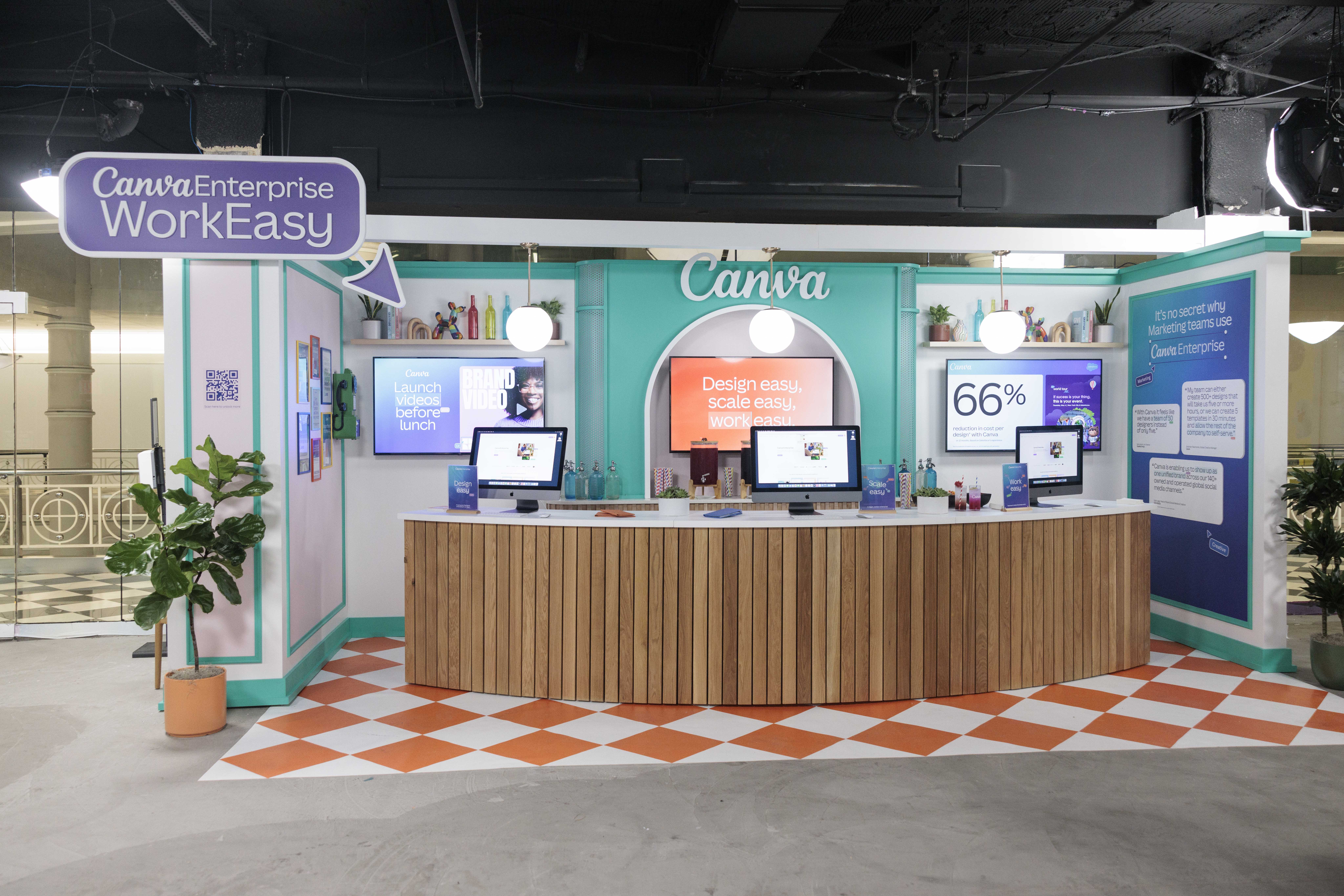
With built-in approvals and integrations with tools like Salesforce and HubSpot, teams create content that actually connects. Salesforce reduced its cost per design by 66%(opens in a new tab or window) and increased design production by 63% with Canva Enterprise. (Also see Forrester's Total Economic Impact study(opens in a new tab or window))
What you get:
Everything in Canva Business, plus:
- Enterprise security & compliance: Meet security requirements(opens in a new tab or window) with SSO, SCIM, ISO 27001 and SOC 2 Type II certifications, advanced admin controls, audit logs, data residency options, and AI governance.
- Multi-team organization & governance: Organize by department, region, or business unit with up to 1000 Brand Kits(opens in a new tab or window), tiered approvals, multi-team and centralized asset management, and usage analytics to track ROI across your organization.
- Custom integrations & automation: Connect with your tech stack through API access, two-way DAM sync (Bynder, Widen, Brandfolder), native Salesforce and HubSpot apps, marketing automation (Marketo, Eloqua), and data connectors.
- Dedicated support & professional services: Get a dedicated customer success manager, professional onboarding(opens in a new tab or window) with tailored implementation, SLA guarantees, priority support, Creative Services for complex projects, and quarterly business reviews.
With content created across departments, brand integrity can be hard to maintain. Keep every department on-brand effortlessly with built-in controls and approval processes.
What can Canva Enterprise do for you?
Achieve more in less time: Canva Enterprise offers a versatile Visual Suite(opens in a new tab or window), AI tools, advanced analytics, and integrations – all designed to accelerate time-to-market.
Scale your brand: Amplify your brand at every touchpoint and break design bottlenecks, thanks to powerful brand management features(opens in a new tab or window) and an AI-powered Magic Studio(opens in a new tab or window). Empower non-designers to elevate their content with stunning visuals, while you ensure brand integrity with design approvals and brand controls.
Secure peace of mind: Enterprise-level safety features(opens in a new tab or window) mean customizable user permissions, admin controls, and AI controls. Maintain oversight with usage reporting features to help your organization beat risk.
Consolidate creative tools: Canva Enterprise brings together design, collaboration, brand management, and publishing in one platform—eliminating the need for multiple disconnected tools(opens in a new tab or window). Plus, seamless integrations with your existing tech stack like Salesforce(opens in a new tab or window), HubSpot(opens in a new tab or window), and DAMs keep your workflows connected.
Instantly transform your Salesforce data into decks and sales assets that wow clients and win new customers. Bring your data-rich sales visuals from basic to best in class in one easy, automated workflow with our Salesforce AppExchange integration. Exclusive to Canva Enterprise.
How do storage and AI access compare across Canva plans?
Every plan includes cloud storage and access to Canva's AI tools; higher tiers add more of both. (excluding the free trials and Pro Lite)
- Canva Pro: 100GB of cloud storage, with full access to AI tools like Magic Write, Magic Layers, Canva AI connectors, Affinity with AI and video animations.
- Canva Business: 500GB of cloud storage per person, with twice more AI usage limits than Pro, plus access to Flourish and AI admin controls (Canva Shield(opens in a new tab or window)).
- Canva Enterprise: 1TB of cloud storage, customized AI usage limits, plus minimum 100 seats for Canva Shield(opens in a new tab or window) - AI output indemnity.
What's the difference between Canva Enterprise and Canva Pro?
So, what sets Canva Enterprise apart from Canva Pro?
It all comes down to who's using it. Canva Pro is designed for individuals and solo creators who want to create stunning designs with ease. If you want to create faster like a pro and need a single-person plan—this is the perfect fit.
Canva Enterprise gives you all the design benefits of Canva Pro, plus features built for bigger organizations. Think customizable brand controls to keep branding consistent across every team—from marketing to HR to sales. Plus an advanced suite of collaborative tools, security features, and admin controls that larger companies need.
Ready for enterprise-grade design? Contact Sales(opens in a new tab or window).
What's the difference between Canva Enterprise and Canva Business?
When comparing Canva Enterprise versus Business, it's about scale.
Canva Business is designed with all the building blocks for effective teamwork—advanced collaboration features(opens in a new tab or window) that bring teams together in real-time for better communication and greater productivity.
It's perfect for small to medium-sized businesses that need to simplify workflows and quickly create compelling on-brand content.
Canva Enterprise, on the other hand, is built for larger multi-team organizations. It addresses more complex needs like advanced team management, additional security layers, and everything procurement teams look for.
Tailored to support large single teams of 100+ employees or multiple teams, Canva Enterprise is perfect for gaining cross-functional access to Canva across your organization.
You'll get all the creative, brand management and collaborative benefits of Business, plus capabilities that handle more enterprise-level deployment or custom integrations. For example, you can manage multiple teams and departments under one organization setup and set granular permissions on content and sharing.
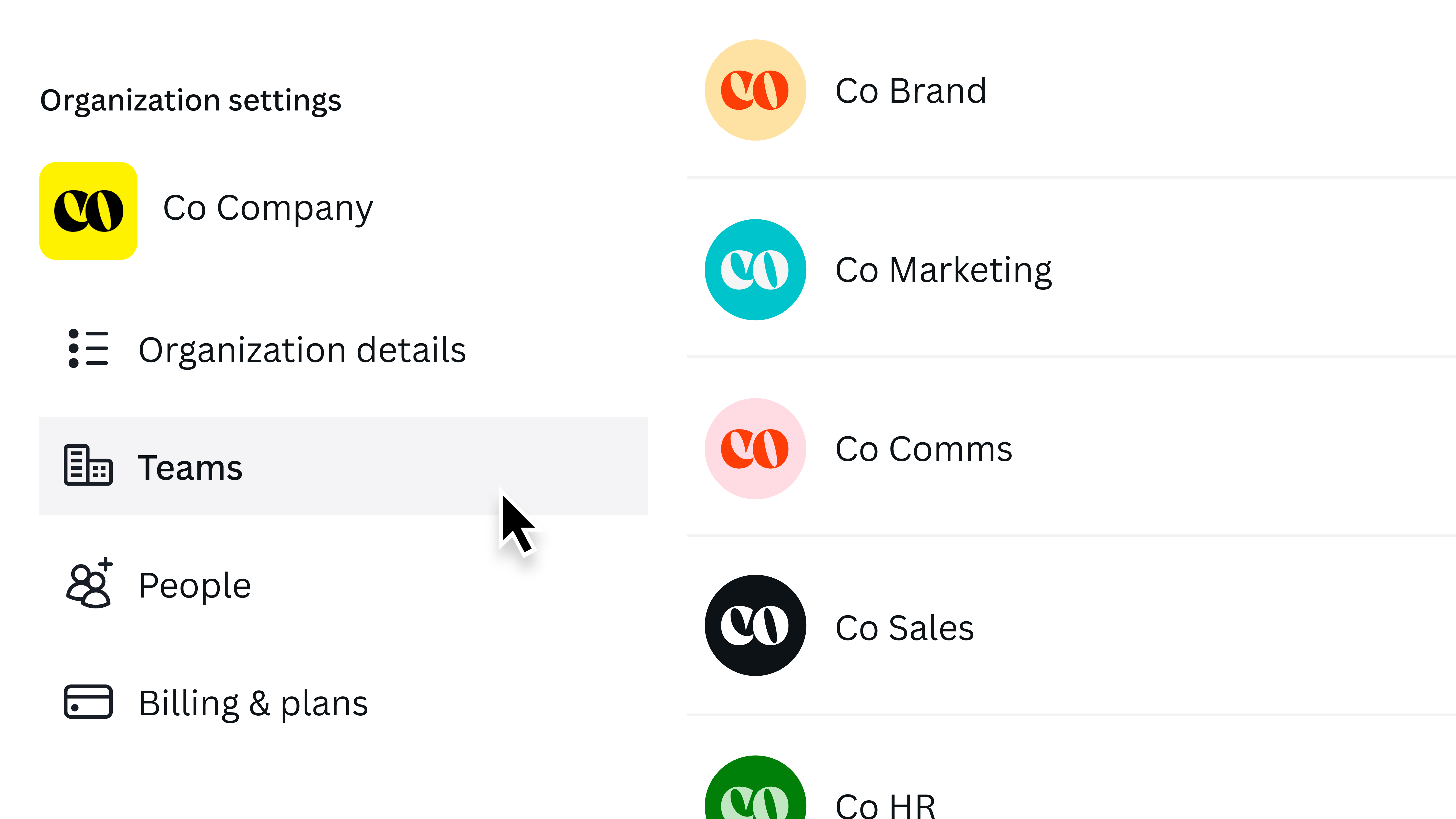
Match your Canva account to your organizational structure with a multi-team setup. Organize your teams by sub-brands or sort them by department. Available for Canva Enterprise users.
See Canva Enterprise in action. Watch the demo(opens in a new tab or window).
What's the difference between Canva Business and Canva Pro?
If you're not quite at the Enterprise level, you might be wondering how to choose between Canva Business and Canva Pro.
The difference? Canva Business gives you the big-brand power to scale and grow.
Canva Pro is the best choice for individuals and solo creators looking to create stand-out content with ease. It's fundamentally a single-user plan.
Canva Business is specifically designed for small businesses, whether you're working solo or in a team. It gives you access to smarter marketing insights and advanced design tools to help your business grow, including Canva Grow for optimizing ad performance, and Flourish Presenter plan for turning data into interactive stories that impress customers. Plus, you’ll enjoy a 10% print discount* to bring your brand to life beyond digital.
If you're working on a small team or want to power business growth, we'd recommend Canva Business.
Now that we've compared Canva Enterprise versus Business versus Pro, it's time to choose. View our complete feature comparison and pricing(opens in a new tab or window) to see how each plan stacks up.
*Available only where Canva Print is offered. Cannot be combined with other offers.
**AI allowance during trial is the same as Canva Free. Access the full allowance (10x more) when you start your paid plan.
Frequently Asked Questions
1. What is the difference between Canva Pro, Canva Business, and Canva Enterprise?
Canva Pro is a single-user plan for individual creators. Canva Business adds brand management, team collaboration and marketing tools for small teams. Canva Enterprise adds multi-team governance, advanced security and custom integrations for large organizations with 100 or more employees.
2. Who is Canva Pro designed for?
Canva Pro is designed for individual creators and solo business owners. It includes unlimited premium content, Brand Kit access and AI-powered design tools, but only one person can hold the subscription.
3. Who is Canva Business designed for?
Canva Business is designed for small businesses working solo or in small teams. It combines Canva Pro's features with Canva Grow ad insights, up to 100 Brand Kits, 500GB of storage, and real-time collaboration and approval workflows.
4. Who is Canva Enterprise designed for?
Canva Enterprise is designed for large organizations with multiple teams, typically 100 or more employees, that need cross-functional access across marketing, sales, HR and communications, along with enterprise-grade security and governance.
5. What security features does Canva Enterprise include that Pro and Business don't?
Canva Enterprise includes SSO, SCIM, ISO 27001 and SOC 2 Type II certifications, advanced admin controls, audit logs, data residency options and AI governance controls, none of which are available on Canva Pro or Canva Business.
6. Does Canva Enterprise integrate with other business tools?
Yes. Canva Enterprise supports API access, two-way DAM sync with Bynder, Widen and Brandfolder, native Salesforce and HubSpot apps, and connections to marketing automation platforms like Marketo and Eloqua.
7. How many Brand Kits can each Canva plan create?
Canva Business supports up to 100 Brand Kits. Canva Enterprise supports up to 1,000 Brand Kits with multi-level approvals and centralized asset management across departments.
8. How much does Canva Enterprise cost?
Canva Enterprise uses custom pricing based on an organization's size and needs. Teams should contact Canva Sales at canva.com/contact-sales for a quote, while Canva Pro and Canva Business use flat monthly and per-person pricing.
Also, canva.com/contact-sales applies for companies that are a Canva Business fit yet have larger scale or more complex buying needs—such as procurement, invoicing, or a higher number of licences.
9. Can a small business use Canva Enterprise instead of Canva Business?
It's possible, but Canva Business is built for small to medium teams that need brand consistency and collaboration without complex procurement or security requirements. Canva Enterprise suits larger, multi-team organizations with dedicated IT and security needs.
10. Does Canva Enterprise reduce production costs and time?
Canva Enterprise customers have reported measurable gains. Salesforce, for example, reduced its cost per design by 66% and increased design production by 63% after adopting Canva Enterprise, using Brand Kit, approvals and Magic Switch resizing. Source: canva.com/case-studies/salesforce/.
11. How do I move from Canva Business to Canva Enterprise?
Contact Canva Sales at canva.com/contact-sales to discuss your organization's size and needs. Canva's enterprise onboarding includes a dedicated customer success manager and professional services for a tailored implementation.
12. How much does Canva cost per month?
Canva Pro costs US$12/month per person billed yearly, or US$18 month-to-month. Canva Business costs US$20.83/month per person billed yearly, or US$25 month-to-month. Canva Enterprise is custom-priced per organization. All are US pricing; see canva.com/pricing for your region.
13. Is Canva Premium the same as Canva Pro?
Yes. "Canva Premium" isn't an official plan name, but it usually refers to Canva Pro, the single-user paid plan. Larger organizations looking for a premium plan for many teams should compare Canva Business and Canva Enterprise.
14. What happened to Canva for Teams?
Canva for Teams became Canva Business. The plan is priced per person (US$20.83/month billed yearly) and adds brand controls, approval workflows and team collaboration on top of everything in Canva Pro.
15. Why pay for Canva Pro when Canva Free is so good?
Short answer: Canva Pro isn’t expensive, it’s bundled. At US$144 a year (that’s $12 a month billed annually), it replaces three or four tools most creators already pay for separately.
Canva Free is, honestly, one of the best freemium products in the world. Millions of people design beautifully without ever paying, and that’s by design. You get real templates, full editing and 5GB of storage, free forever. For plenty of people, that genuinely is enough.
Pro is for when design becomes part of how you work, not a one-off. The upgrade buys you:
- The full premium library: 141M+ photos, videos, graphics and audio, plus 3.6M+ templates (vs ~1.6M on Free)
- 5 Brand Kits with your logos, fonts and colours, so everything stays on-brand automatically (vs 1 Brand kit and 3 colours only on Free)
- The real time-savers: Magic Resize, Background Remover, one-click transparent and SVG exports, and the full AI tool suite
- 100GB of cloud storage (vs 5GB) and built-in social scheduling
16. How can I get Canva at a lower price?
Billing yearly cuts Canva Pro from US$18 to US$12/month, a 33% saving; and 16% savings for Canva Business.
17. Do team members have to pay for Canva?
On Canva Business, each member needs a paid seat, priced per person. People on the Free plan can still collaborate on designs shared with them. However, Free users will only have access to features available on their plan, so some premium elements or tools may not be editable for them.
18. Does Canva Business have unlimited AI?
Every plan includes a monthly AI allowance that resets each month, and higher plans get more: Canva Free gets up to 20 Standard or Premium AI uses; Canva Pro includes about 10x more AI(including Premium or Ultra) than Canva Free, and Canva Business and Enterprise include about 20x more. If you need extra, Pro and Business offer an AI Pass add-on and top-ups. The exact number of uses depends on which AI tools you use (Standard, Premium or Ultra).

Written by
Canva Team