Canva home

Easy drag-and-drop editor

1M+ professionally-designed templates

Design from any device

Generate content and media with AI

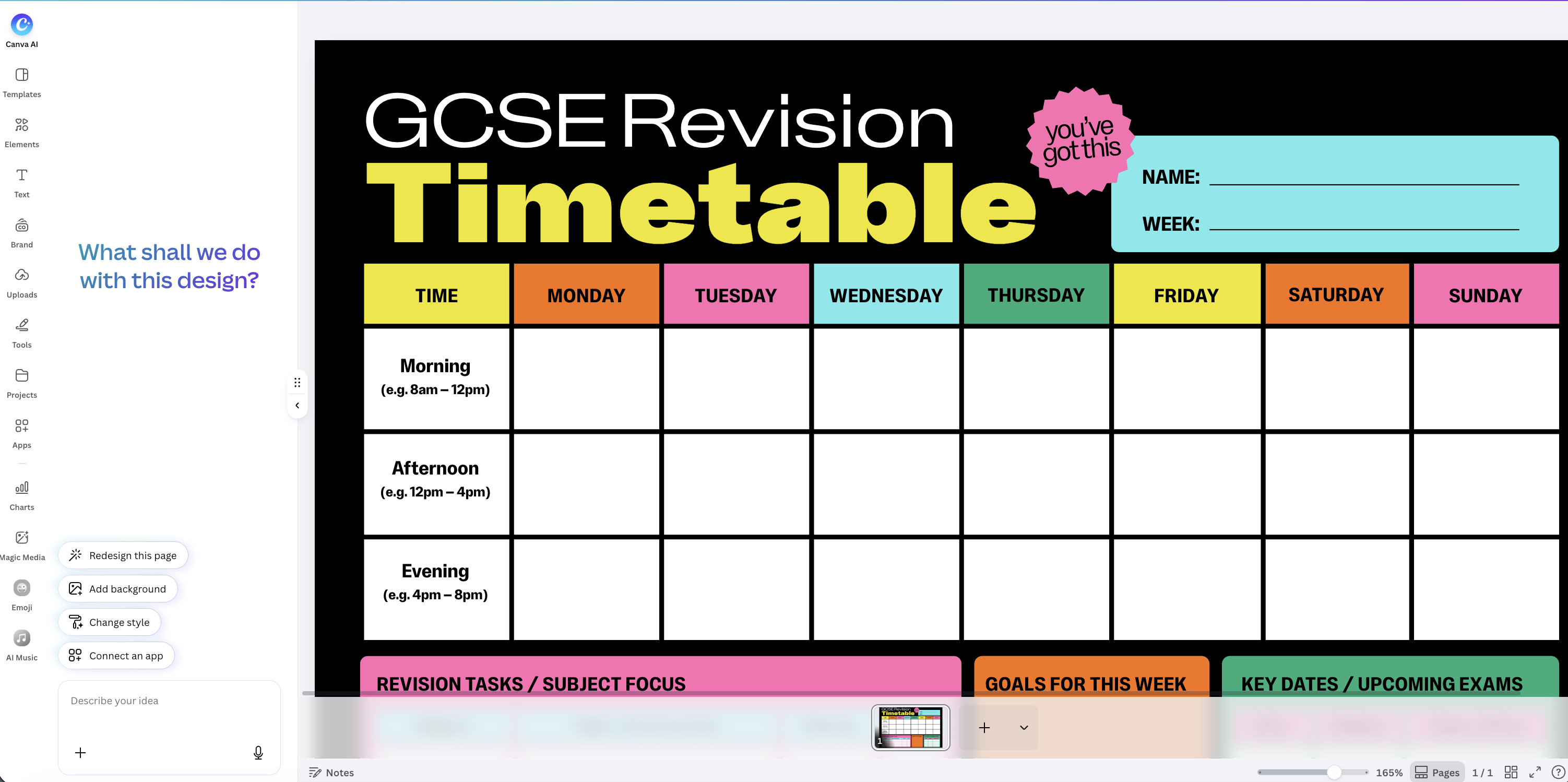
Revising for your GCSEs, A-Levels, or any other UK exam this year? Start from a blank canvas in Canva and build your own revision timetable from scratch.

Lay it out the way your brain works, by day, by week, or by subject, colour-code the bits that need more attention, and build in proper breaks.

Prefer a ready-made starting point? Use Canva AI⁠(opens in a new tab or window) within the design platform to generate a fully interactive timetable that works for your schedule. Canva also has free, customisable pre-made templates to get you inspired.

Exam Revision Timetable AI

Let Canva AI build the first draft

A good revision timetable turns a vague “I should probably be revising” into something concrete, exactly what to study, and when.

Tell Canva AI⁠(opens in a new tab or window) your subjects and exam dates, and build a timetable with Canva's AI Code Generator⁠(opens in a new tab or window), not just a blank grid. You can even ask for interactive elements such as drop-downs for each slot, a mind map,⁠(opens in a new tab or window) a calendar, a countdown, or trackers to mark off what you’ve covered. However it comes out, you can drag sessions around, resize them, and recolour by subject or confidence as you go.

How to make a revision timetable

How to make a  revision timetable

Keep track as you go

Breaking your revision down by topic rather than just by subject makes it easier to see real progress, tick off a topic once you’ve covered it, and you’ll get a clearer, more honest sense of how much is left than a subject name alone gives you. If you’re keeping notes on what you’ve covered, or want somewhere to jot down flashcard ideas as you plan, pair your timetable with Canva’s notes⁠(opens in a new tab or window) to keep the two side by side rather than scattered across different apps.

Revise with others, not just for them

Revision doesn’t have to be something you do entirely alone. Share your timetable⁠(opens in a new tab or window) with a parent, a sibling, or the friend you’re revising the same subject with, so someone else can see the plan and help you stick to it. If you’re working through topics with a study group, work on the same timetable together in Canva and update it in real time as you cover things, rather than each of you keeping a separate version that falls out of sync within a week.

When the plan slips, don’t scrap it

Every revision timetable gets knocked off course at some point. When it does, don’t redo the whole thing, move the missed topic to the next free slot, drop whatever mattered least, and carry on. A to-do list⁠(opens in a new tab or window) can help you track what’s still outstanding, and a timeline⁠(opens in a new tab or window) of the months ahead keeps one bad week in perspective. Once you’re happy with it, download it as a PDF, print it, or keep a copy on your phone.

FAQ

It turns a vague sense of “I should probably be revising” into a specific plan, which subject, which topic, and when. Most exam stress comes from not knowing whether you’re actually on track, a timetable answers that directly, rather than leaving you to guess. It also stops the easy trap of revising what you enjoy most while avoiding the subjects you find hardest, since the plan forces you to give those the time they need rather than the time you feel like giving them.

It depends on where you are in the run-up to your exams. In the weeks beforehand, 2–4 hours on a weekday and 4–6 hours on a weekend day is realistic for most people. Once study leave starts, 6–8 hours a day is more common, but build in proper breaks rather than treating it as one long stretch.

Earlier than most people think, three to four months before your exams start is a sensible point to begin. Starting late tends to mean cramming rather than properly covering everything, whatever exams you’re preparing for.

Active recall, testing yourself rather than just re-reading notes, and spaced repetition, revisiting topics over time rather than all at once, are the two most effective techniques. Past papers or practice questions are worth building into your timetable regularly too, they’re one of the best ways to check whether revision is actually sinking in.

Ask for it directly in your prompt, interactive elements aren’t automatic, they depend on what you request. For example: “Create an interactive revision timetable for my final exams. Exams run from May to June. My subjects are Maths, Chemistry, Biology and Economics, with Maths as my weakest. Include a dropdown to select the subject for each slot, a countdown to my first exam, and a tracker I can use to mark off topics once I’ve covered them.” The more specific you are about which interactive features you want, the more likely you’ll get them. You don’t need to get it right in one go either, keep prompting to adjust it, add a feature you forgot, change the balance between subjects, or ask for a different layout entirely.

Yes, in two ways. Keep prompting the AI to make changes for you, rephrase it, rebalance the subjects, add something you forgot, or edit it directly yourself: drag sessions to a different day, resize blocks if a topic needs more time than the AI gave it, and recolour by subject or confidence level as you go.

Yes. Download it as a PDF or image to print and put somewhere you’ll see it, keep a digital copy on your phone, or share it with a parent, sibling or study group so someone else can see the plan too.

The same way as on desktop, open Canva on your phone or tablet and either start from a blank canvas, pick a template, or prompt the AI to build one for you. Everything’s editable on a smaller screen too, drag sessions between days, resize blocks, or just keep prompting the AI if typing out detailed edits by hand feels fiddly on a touchscreen. Download it as an image or PDF when you’re done, or just keep it open in the app as your go-to copy.
Quotation mark
@canva is simply outstanding as a tool to create designs. Using Canva is such a seamless experience that once you sit down to design, you don't feel like getting up. It's addictive and useful. Keep going Canva.

@navneet4

Explore more timetable resources


More Designs