- Canva: The ultimate design tool for team collaboration
Canva: The ultimate design tool for team collaboration

Working in a large organisation with over 100+ employees? Learn how to communicate visually, boost productivity, and stay on brand, at scale. Get in touch(opens in a new tab or window).
Design and editing are no longer complicated, expensive, and inaccessible processes exclusive to professional designers. Today, there are countless graphic design(opens in a new tab or window) tools for non-designers that help teams unlock their potential and drive business growth. These tools can operate as a visual and interactive workspace that has the ability to transform the way teams operate and ideate.
Canva is a visual workspace that makes design and collaboration(opens in a new tab or window) easy despite roadblocks like price, experience, and team bandwidth. Canva has a low barrier to entry with simple and user-friendly features that help increase content production. From social media templates to inspire new design ideas to collaboration features for teams, Canva is one of the best design tools for non-designers.
It’s easy to get started with Canva
Canva makes it easy for teams without prior design experience to learn and start creating right in the platform.
With Canva’s intuitive drag-and-drop functionality and editing tools, you and your team can easily play around with designs and produce high-quality visual content. If you get stuck, Canva’s blog articles, help center, and Design School(opens in a new tab or window) provide tutorials that explain how to use the product and get you up to speed on the latest design trends.
And if you’re working on a remote, global team, the platform is now available in more than 100 languages. Team members can collaborate in their respective languages without the need for translation services.
Lastly, to reduce any cost-related barriers, teams with smaller budgets can benefit from Canva’s freemium model. There’s no need to convince leadership to invest in pricey design software or an expensive third-party design firm.
Canva features increase productivity, collaboration, and ideation
Canva has a minefield of features to make your team more productive and collaborative. Teams can take advantage of free design brief(opens in a new tab or window) templates, royalty-free assets, design-sharing options, and commenting capabilities. When all the work and communication are done in one place, you can speed up the stages of ideation, feedback, and delivery and make time for other high-priority tasks.
With Canva, you don’t need to wait on a graphic designer or request custom designs from your design partners. Remove these bottlenecks and empower your team to deliver projects quickly. Get creative with Canva’s consistently updated stock photos, videos, and other graphic design elements. Discuss and collaborate on your ideas visually with whiteboards, graphs, or presentations.
Once ready, quickly share your design with external stakeholders and leave feedback, assign new tasks, or give approval as needed.
Now that the corporate branding team is spending less time on custom creative requests, we're able to really strategize and prioritize our brand's customer experience. It's awesome to be able to free up time for these initiatives. — Reid Thomas, Art Director at Camp Bow Wow

Share your Canva designs with other team members or external stakeholders.
Brand kits and folders help your team stay organized and on brand
Brand kits and asset folders keep your team organized and help maintain brand consistency in your designs.
Add custom color palettes, fonts, logos, and templates to your Canva brand kit. That way, every member of your team can select custom templates and edit designs while staying on brand.

Save your color palette and relevant brand color schemes in Canva’s brand kit.
Create project folders organized according to use cases, departments, or campaigns. In Canva, you can control who has access to these folders. That way, you avoid inconsistencies, unwanted design choices, or accidentally sharing confidential information. If you’re working with freelance bloggers, they probably don’t need access to your internal human resources folder, but they might need access to the stock images in your marketing folder.
Store multiple versions of files so that your team can quickly grab the file format they need. Or use Canva’s Magic Switch tool(opens in a new tab or window) to easily resize designs as needed.
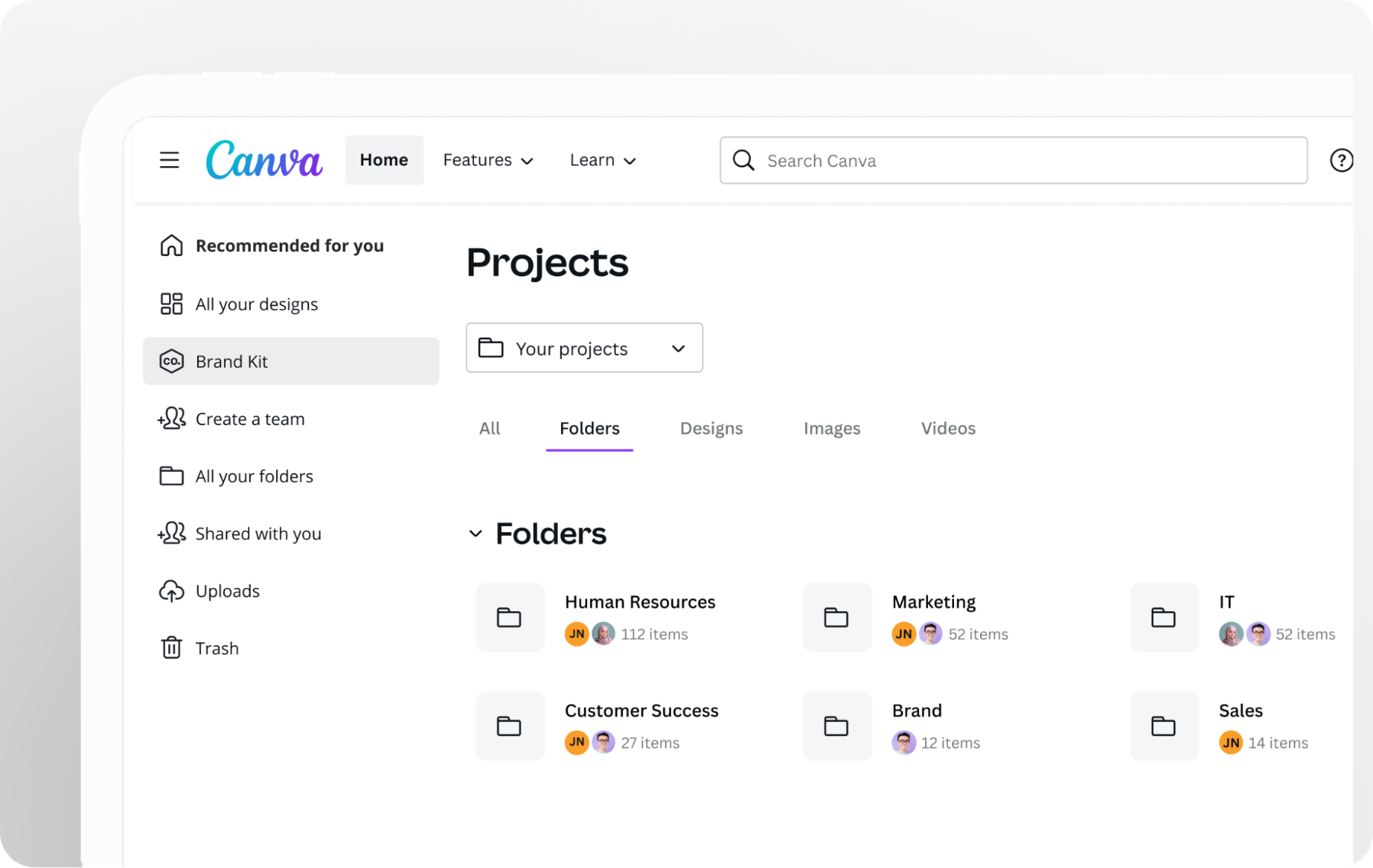
Create folders in Canva to manage your team’s content.
TIP: Even the most experienced designers rely on reference materials or previous ideas to inspire new ones. Create a folder of previous templates, designs, or brainstorms that can spark new content ideas.
Review and approval workflows occur in one place
In Canva, the review and approval process occurs within the design. Users can comment and tag(opens in a new tab or window) teammates on each design page to request or give feedback rather than having to jump back and forth between platforms.
Requesting and providing feedback in this transparent manner allows everyone involved in the content production process to stay on the same page.

Give and assign feedback to your team using Canva’s commenting and tagging features.
Presentations that unite remote teams
Over 700 million presentations have been created on Canva. Presentations are a great way to establish trust and buy-in from external and internal stakeholders for new projects or ideas. Plus, video presentations(opens in a new tab or window) are a great way to keep remote teams engaged and establish rapport.
Canva users can record and present(opens in a new tab or window) a presentation in Canva. Use these presentations to share team updates or walk your team through reporting. Some teams might even use these presentations to develop static educational resources. For example, your HR team could create a whole series of onboarding presentations and compile them into a workflow for new hires.

Remote teams can record and present a presentation in Canva.
TIP: To report numbers or other analytical data with graphs, use flourish charts and maps(opens in a new tab or window) in your presentation to convey information quickly and clearly while keeping the stakeholders engaged.
Many teams also host virtual meetings and record them for reference later on or for teammates who could not attend in real time. After recording an important meeting, you can easily edit and embed Zoom(opens in a new tab or window) videos in Canva whiteboards, docs, or presentations and keep everyone informed on the latest team updates.

Use Canva’s video editing capabilities to cut or add footage to your video.
No code required website design
Canva’s visual worksuite includes one-page website design(opens in a new tab or window) templates that you can easily edit and publish to a domain through Canva. Presets provide a starting point with a layout, fonts, and example CTAs. Allow your team to tweak these templates or create website mockups that align with your brand guidelines.
When you build a site using Canva’s website templates(opens in a new tab or window), responsive design is automatically incorporated. A mobile-friendly website is integral to your brand’s success. Once your site is live, Canva tracks your site engagement and provides you with key performance insights. “Device views” tells you which devices your audience viewed your website on. Say you find that mobile devices outperform desktops. Your team can brainstorm ways to implement a marketing or content strategy optimized for mobile.
Print production services to enhance your marketing presence
Though we live in a digital world, there are plenty of opportunities to enhance your physical marketing presence through Canva’s print services(opens in a new tab or window). Whether you are printing flyers, mugs, or stickers(opens in a new tab or window), Canva makes it easy for your team to collaborate on new swag for your business. You’ll save time and money when you have control over the design rather than outsourcing to a vendor.
Ownership and control over your designs are especially prudent when cross-department collaboration is involved. If you are creating customized wall calendars for each department in your company, create mockups of the designs for each one and offer feedback until you get final approval. Then all you do is hit the purchase button, and Canva takes care of the rest!
Fun fact: Canva plants a tree for every print job.
A visual communication tool for every department
As visual communication becomes more prevalent and effective in engaging the workforce, teams of all sorts need a platform that makes it easy to shift their work communication styles to a visual one.
People are looking for new ways to communicate. They need to cut through the flood of information that’s coming in now. [Whether you’re working on a small or large team] you need to communicate your ideas and rally people and get them behind you. — Canva’s Chief Product Officer and Co-Founder Cameron Adams
Canva’s visual worksuite improves the design process and provides a space for all teams to collaborate and make great things happen. This means that visual comms are not reserved just for the creative departments like marketing and design. Your IT team could use infographics to better explain how to work with internal tools. Your HR team can create presentations that get employees excited about new roles and company culture.
Whatever team you’re on, encourage everyone to use a visual space to communicate, create, and learn from one another. With a tool like Canva, you’ll discover ways that design can help shape your ideas and solve important problems.

Written by
Shani Leead