- Create AI Presentation
AI presentation maker


Easy drag-and-drop editor
3M+ free stock photos and graphics
Generate content and media with AI
Invite others and design together
Create slides in seconds with Magic Design™ for Presentations, an AI-powered tool for generating on-brand, attention-grabbing presentations. With your first draft in the bag, you can add details and instantly apply your branding. It’s never been easier to create captivating designs.

Create lightning-fast designs with an AI presentation maker
Turn any concept into a stunning presentation in a flash. Magic Design for Presentations quickly brings your ideas to life, giving you the head start you need. The AI tool generates professional, high-quality draft presentations complete with content.
With a high starting point to work from, you have more time to apply your Brand Kit (Pro)(opens in a new tab or window), plus extra hours to practice in front of a mirror. It’s the ultimate sidekick to boost your productivity, spark inspiration, and speed up your design process.
How to make presentations using AI

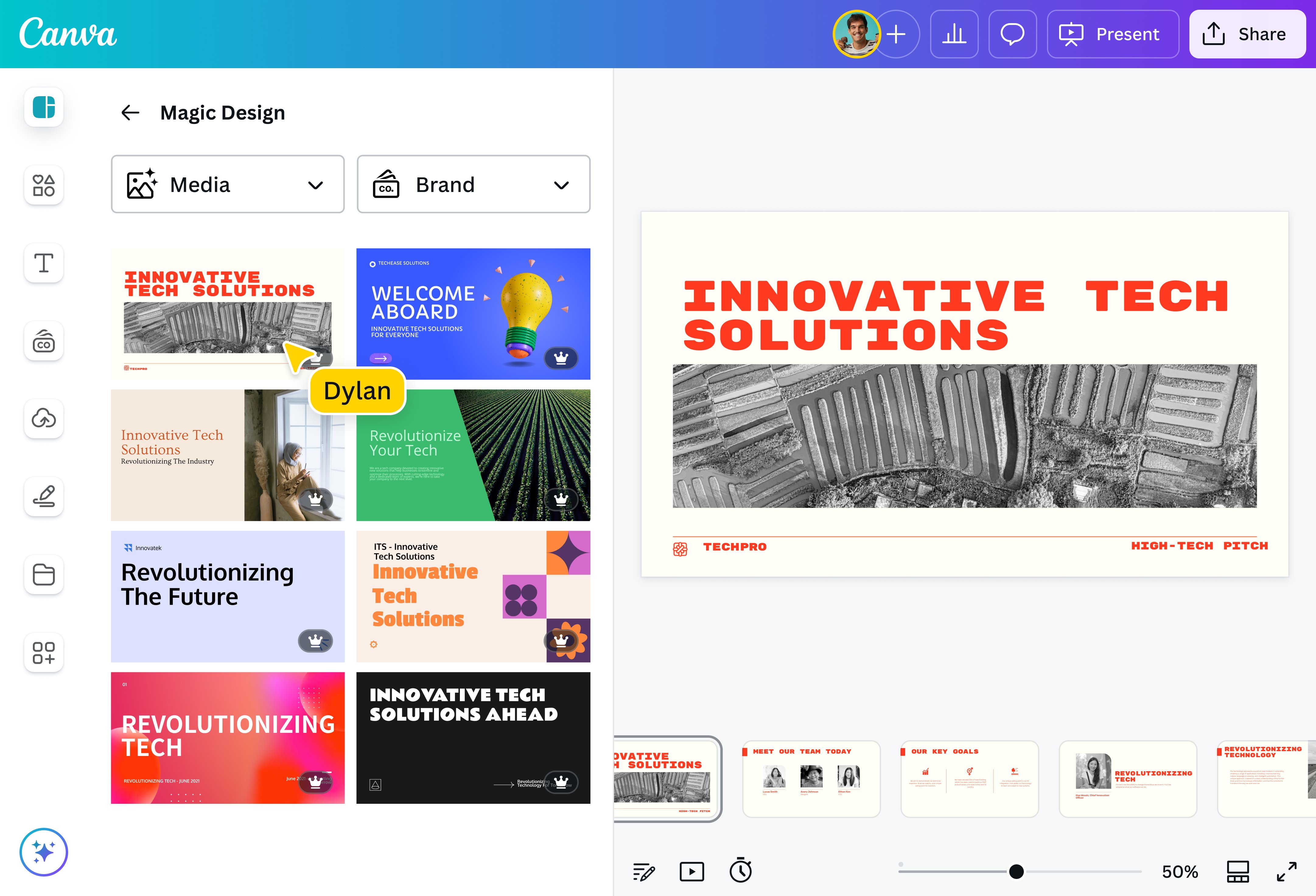
Articulate your ideas clearly with an AI presentation tool
Just type your idea in a few words and watch Magic Design for Presentations generate slides filled with an outline and content of your topic. Need inspiration? Use the topic generator(opens in a new tab or window) to brainstorm ideas before you start. The AI presentation maker considers your prompt and turns it into a deck of slides that tells your story and takes your audience through a cohesive narrative. Formatting and layout are taken care of, too, so you can focus on small but impactful details.
When your idea is better shown than told, say it with your screen. Capture workflow demos or tutorials with a single click using Desktop Screen Recorder, then edit instantly and drop the video directly into your design—no downloads or app switching needed. Record once, and let your audience follow along at their own pace. You can even transcribe your video to text(opens in a new tab or window) to create captions or repurpose your content.
Perfect the content of your presentation
You have more than just an AI presentation maker; you can access AI-powered features to perfect your slides. Match it to your brand and style with Magic Write™(opens in a new tab or window), your AI writing assistant. Use it to reword sentences, summarize or expand text, and make your words more effective. You can also ask Magic Write to generate presenter notes so you can speak confidently. Presenting to a multi-lingual audience? Use Translate(opens in a new tab or window) to quickly translate your content into over 100 languages.
Create unforgettable data stories with powerful data visualization tools. With Magic Insights, you can instantly uncover patterns, trends, and key takeaways through AI-powered data analysis(opens in a new tab or window). Not sure what chart to use for your data? Try Magic Charts and with a click, turn complex info into interactive charts that work beautifully with your brand.
Level up your slides with more AI-powered tools
Take your presentation up a notch with more AI tools(opens in a new tab or window). Use Magic Animate to quickly add motion and life to the deck. Can't find the perfect photo for a slide? Magic Media(opens in a new tab or window) and Dream Lab, the AI image generators on Canva, will help you generate photos or AI anime art(opens in a new tab or window) to complement the text. Access other awesome AI apps like Murf AI(opens in a new tab or window) for natural-sounding AI voiceovers, the AI headshot generator(opens in a new tab or window) for professional shots, and Krikey AI(opens in a new tab or window) for custom, 3D animated avatars.
Thinking about audience engagement? Take it up a notch with interactive experiences built with Canva Code. With just a text prompt, Canva Code generates engaging experiences like mini-games, pricing calculators, and interactive widgets for your presentation, with no coding required.
Stay on brand and present confidently
Keep your AI presentation on brand, whether it's a pitch deck to win new customers, an onboarding deck, or a presentation for a project kick-off. Layouts shows you all the different, on-brand layout suggestions you can use to arrange your slides — simply select the most engaging one and watch it instantly applied to your design.
Feel like switching it up? Styles lets you match your presentation to another design's colors, fonts, and elements with a single click. Invite your team to collaborate and edit the slides to create an incredible AI presentation together. And when you're ready to present, Remote Control Notes makes it effortless. Use your phone to advance slides and view your speaker notes in one place so you can move freely, connect with your audience, and deliver with confidence.
FAQ
Canva gives you non-exclusive licenses to use various elements in your designs, including photos, graphics, videos, fonts, and music.
Our values define how we build our products, treat our community, and impact the world. We want to ensure our community feels safe when creating and interacting with content on our platform.
To ensure our community can enjoy Magic Design safely and responsibly, we’ve put various measures in place, including automated reviews of input prompts for terms that may generate inappropriate content. Users can report unsafe content here, and we also encourage you to get in touch with our support team to provide feedback at any time.
We won’t tolerate any use of Magic Design that violates our Terms and Acceptable Use Policy.

@navneet4


