- Create Facebook Event Cover
Create stunning Facebook Event Covers
Create stunning Facebook Event Covers


Easy drag-and-drop editor
3M+ free stock photos and graphics
Generate content and media with AI
Invite others and design together
Design stunning covers for your Facebook Event and get more rsvps than ever!

Easily publicize your event with the help of an effective Facebook event cover
It’s not surprising that a lot of people are setting up their events in Facebook. Given its 1.49 billion active users (and counting!), it is undeniably an effective tool for reaching out to people and piqueing their interest. And there’s little doubt the event organizer finds little fun in sending out individual invites, coordinating RSVPs, or handing out flyers for public events.
That flyer will now take the form of your page’s Facebook event cover. Our professionally designed templates will give you choices ranging from designs for personal gatherings to public lollapalooza. Our easy-to-use drag-and-drop interface and wide selection of stock photos lets even non-designers craft cover designs that can accommodate any event. As an organizer, you will now be able to create hype and viral marketing for your event at no extra cost.
How to make a Facebook event cover photo

Meet Magic Studio™: All the power of Canva’s AI
Magic Studio™ brings together the best AI-powered tools for you and your team to help you design with more ease, speed, and creativity.


Choose from a range of professionally designed Facebook event covers that are a cinch to personalize
If you’re tasked with piecing together an event, the responsibility for raking up excitement and engagement would most probably also fall on your lap. That of course, includes setting up a Facebook event page. The event cover will most probably set up the tone for the gathering, and who else knows this event from top to bottom other than you?
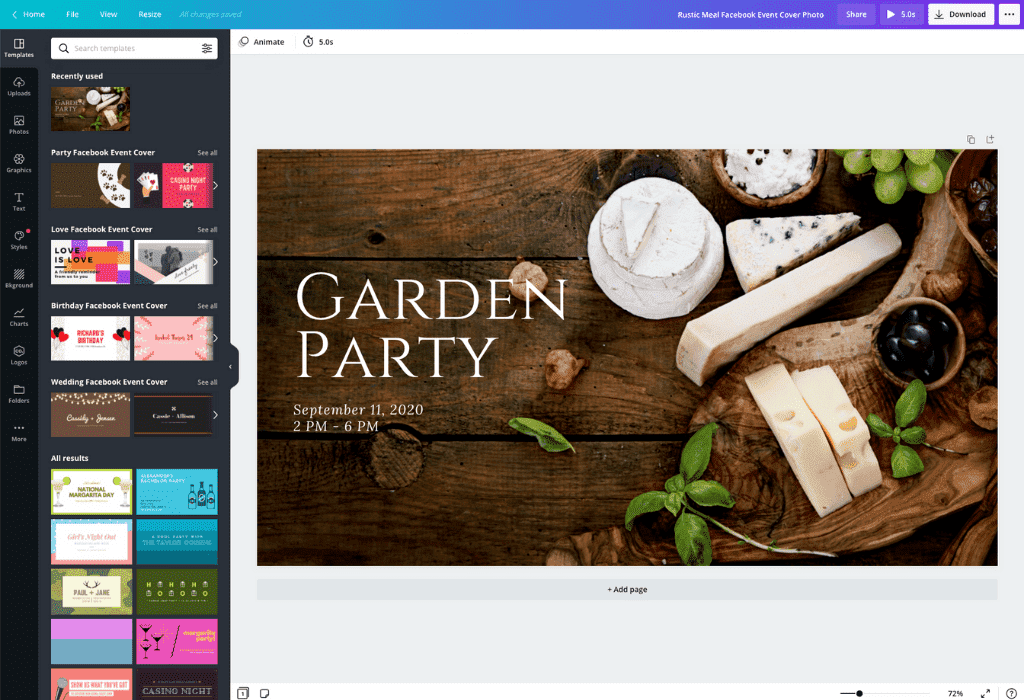
Even if you’re no designer, you can easily craft a Facebook event cover with Canva’s selection of professionally designed templates. The amount of designing you’ll do can range from zero to a lot, depending on how creative you’re feeling. You can use the templates as they are or do your own take with the template as your foundation.
Create a stunning, time-saving Facebook event cover
The easiest way to publicize an event is through an online platform like Facebook events (it has 1.49 billion users and counting!). What’s not so easy is everything else that comes with creating an event. And chances are, you’re coordinating the whole thing yourself. Between juggling meetings, coordinating the budget, and finalizing details, among others.
With Canva’s ready-to-use templates and easy-to-use editor, that Facebook event cover is a cinch to make. Simply select a template that embodies your event and play around with the design elements according to the branding and details that need to go in your event cover. Before you know it, you’re Facebook event cover is ready to make your page a smashing success.
Add a touch of personality or on-brand identity to your Facebook event cover by uploading your own images
Lend your layout its own brand of distinctiveness by fusing it with your brand elements and colors. If it’s a personal event, you can make instant connections by using photos that your attendees will no doubt recognize. Our constantly updated library of stock photos, icons, and many other design elements will come to the rescue if you’re in need of more choices.
Any of the tabs on the editor’s left-hand menu will take you to a world of designing possibilities. Jump from browsing images, uploading your own photos, or selecting fonts with just a few quick clicks!
Share that awesome Facebook event cover on all your digital properties
The final step will decide how effective your Facebook event cover truly is: Download your design in stunning high resolution and load it up on your event page. Click on the Download button and voila, your design work is done!
If your design contains all your event details and can function as a standalone invite, you might want to share it on all your digital properties as well. On the menu bar, you will find a share button that allows you to post, tweet, or send your Facebook event cover to your mailing list. Instant event announcement!
FAQ
At a minimum, your Facebook event cover photo size should be 1200 x 628 pixels, or a 1.91:1 ratio. To make sure it displays well on a retina screen, go for 1920 x 1005. Make the job easier by using a Facebook event cover photo template.
Using a video for your Facebook event cover is easier than it sounds. Simply click the camera icon on your cover and upload the video the same way you would a photo. You can choose to upload a new video or choose one from your library.
Be sure to keep dimensions in mind when creating a Facebook event cover. Your event cover will be different in size from a personal or business page header photo or a Facebook group cover photo. Your event cover should fit the theme of your event and draw people in.
You can upload video clips in the MOV, GIF, MP4, MPEG, MKV, and WEBM formats, with a maximum upload size of 1GB. If the video has a transparent background, we suggest uploading it as a GIF.
You can upload photos, too. If you’re uploading JPEG/JPG, PNG, HEIC/HEIF, or WebP images, make sure your file is:
- Under 50MB in size
- Not more than 250 million total pixels (width x height)
- If it’s a WebP, only static files are supported
If you’re uploading SVG images, make sure your file is:
- Under 3MB in size
- Between 150 to 200 pixels wide
- Saved with an SVG Profile of “SVG 1.1”
To learn more about our media upload requirements, check this guide.

@navneet4


