Free Movie Poster Maker

Easy drag-and-drop editor
3M+ free stock photos and graphics
Try our design and work apps
Download or share designs easily
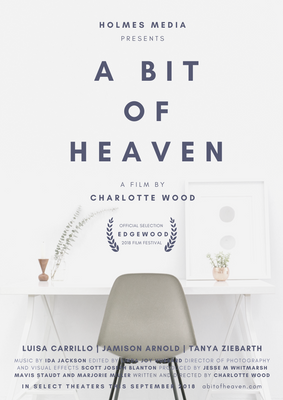
Create a stunning movie poster for any genre using Canva’s free movie poster creator. Choose a ready-made template, then customize the colors, fonts, images, and other elements to tell your story.

Get more viewers with a high-quality movie poster
Engage and lure in viewers with a captivating movie poster that sells your story. Start your design project by browsing through our collection of pre-made, fully customizable templates. Or open a blank layout and create a movie poster from scratch. Go to poster mockups(opens in a new tab or window) to see how your design looks like. For a more impactful visualization, use a billboard mockup(opens in a new tab or window) to see how your poster will stand out in large-scale spaces. Then, add and move around graphics, illustrations, shapes, and text to fit your theme or genre.
Induce nightmares for a horror flick by applying scary fonts. Turn on the intrigue for a mystery film by putting together minimalist shapes. Whether you need a poster for your feature film or are hosting a local film fest or screening, Canva’s free movie poster maker lets you create a winning design that looks straight out of Hollywood’s hall of fame.
How to make a movie poster

Eye-catching movie poster designs for any genre
You don’t need a creative agency or an expert designer on your payroll to make a professional movie poster. You don’t even need any design experience or expensive software. Canva provides hundreds of professionally designed templates for every genre or cinematic project.
Pick designs that match the theme of your film—bold, dynamic fonts for a fantasy epic, monochromatic backdrops for a social documentary, or black and white imagery for a period piece. Canva’s free movie poster templates let you quickly craft a fantastic poster that will boost ticket sales and help you beat your box-office goals.
A visual teaser designed with your audience in mind
Movie posters give viewers a glimpse of what’s to come without giving the entire story away. It blends colors, text, and images to present a theme or concept. Canva has a massive content library with all the design elements you’ll ever need to make your own movie poster.
Choose from thousands of photos, vectors, graphics, stickers, shapes, and icons. Drag and drop elements to the custom movie maker, then edit away. Play around with contrasting colors to reflect your film’s quirky storytelling, or make use of heavy fonts and smoky elements for a neo-noir flick. All free items in our content library are fully licensed for public use, so you can elevate any design project without worrying about the legal technicalities.
From draft concept to final output, all in one place
Been scouring the web for a movie poster maker or software with free downloads? Then you’ve come to the right place. Get everything done on Canva in just a few clicks.
Craft the initial design concept based on the selection of pre-made templates. Freely customize the design you like best to match your project. Then share directly to your online platforms or mail straight to your local printer. You can also avail of Canva Print and order high-quality copies of your work with free standard shipping. Make a movie poster for free online today. Our intuitive, easy-to-use platform brings effortlessly simple design to your fingertips.
FAQ

@navneet4