- Create Birthday Videos
Free birthday video maker


Easy drag-and-drop editor
1M+ professionally-designed templates
Generate content and media with AI
Invite others and design together
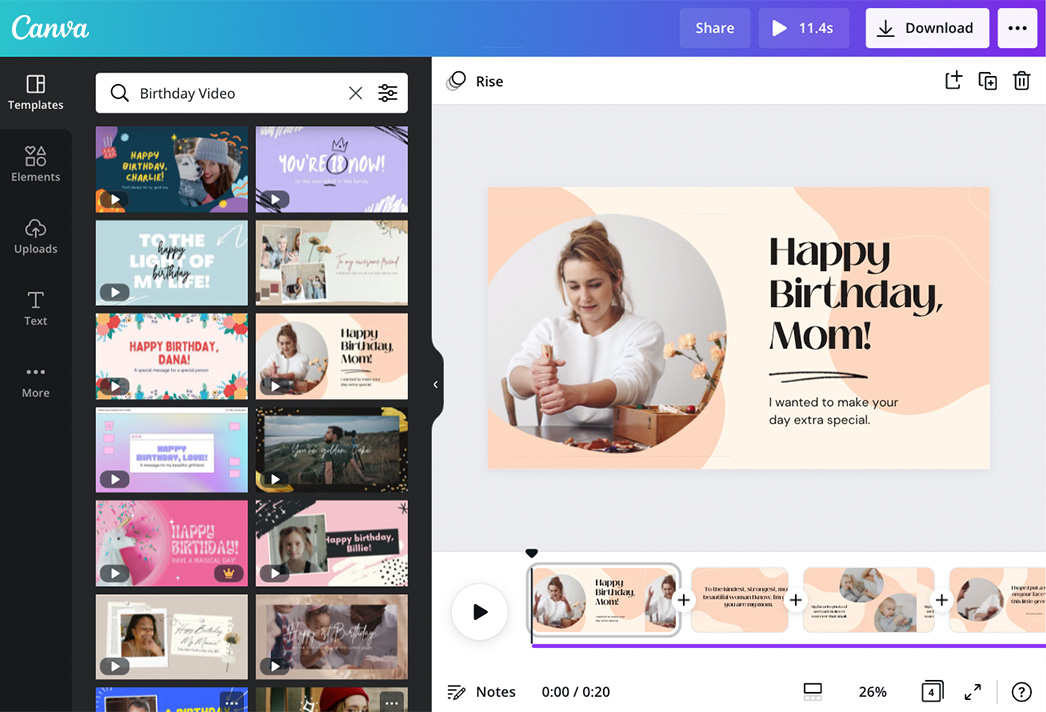
Birthdays are always a happy time with friends, family, or yourself. Balloons, party hats, music and a birthday cake are always present to celebrate a happy occasion. Make that day even more special with a fun birthday video! Whether you’re making a video slideshow of birthday greetings for a friend or wanting a keepsake of your party, create memorable birthday video greetings that feel genuinely personal with Canva’s online birthday video maker(opens in a new tab or window).

Capture memories in birthday video greetings
Memories are always fun to keep, just as it is to look back on. Tie together your most unforgettable moments into a birthday video to make it special. Memories don’t have to be grand. They can be as simple as when you shared coffee with the celebrant or went on a solo vacation instead of a party. Beautifully thread your clips and photos together like a slideshow and spice it up in one festive video.
With Canva’s birthday video maker, editing a video is as easy as pie. Create with a blank canvas or draw inspiration from our free professionally designed templates. You can go for a colorful photo and text layout or a minimalist yet elegant video. Easily upload clips from your gallery and arrange them in frames(opens in a new tab or window), grids(opens in a new tab or window), or a spontaneous flow. Tinker with animations and design elements and add them to your birthday video compilation(opens in a new tab or window) to make your design special.
How to make a birthday video

Meet Magic Studio™: All the power of Canva’s AI
Magic Studio™ brings together the best AI-powered tools for you and your team to help you design with more ease, speed, and creativity.


Celebrations made more fun
Birthdays are as festive as any holiday, but you’ll make the celebration more fun by personalizing a birthday video from our vast library of beautifully designed templates. Put together video greetings from friends and family or your memories growing up and highlight them through a fun photo(opens in a new tab or window) and video montage. Trim, crop(opens in a new tab or window), and resize(opens in a new tab or window) your clips to showcase the best moments and allow the celebrant to feel truly special.
Uniquely dedicated for the celebrant
Capture your favorite moments and seamlessly thread them together through our intuitive video editing tool. Easily drag and drop your memorable photos and clips or video greetings and wishes to your birthday video. You can manually upload them from your gallery to our design dashboard or spontaneously record them while designing.
Move your audience even more by adding the right tune to your video. Sprinkle love, joy, and excitement with pre-licensed music and sound effects(opens in a new tab or window) through each clip. Explore our vast audio library and add your chosen sound to your video. Make it more personal with your own audio or voice recording that you can upload on our video maker.
Groove to a happy birthday song
Discover music tracks that truly capture the festive mood of your birthday party. Start your video slideshow with any of our unique Happy Birthday songs. Rest assured, it's nothing but celebratory renditions that will perfectly match any of our templates or your personalized design using our birthday video maker. Get your best remix and roll it with your photo and video when you layer it with other tracks, apply some smooth fade effects, or sync audio and video with Beat Sync(opens in a new tab or window).
Give the gift of creativity
They say it’s the little things that truly matter. Add elements that best represent the celebrant through our massive collection of icons(opens in a new tab or window), illustrations, stickers(opens in a new tab or window), shapes, and frames to tie in your birthday video. You can now also sketch and draw(opens in a new tab or window) with Canva! Mix and match colors and fonts that cater to the celebrant's personality. Make custom animations with Create an Animation and produce more dynamic and impressive birthday videos.
Whether you're on Canva's desktop or mobile app, there's no limit to what you can do with our free birthday video maker. Seamlessly highlight your precious moments in your birthday video. Drag, drop and position them exquisitely in your layout. Trim your videos, crop your pictures, apply effects and filters to your uploads, and add music(opens in a new tab or window) effortlessly.
FAQ
You can upload video clips in the MOV, GIF, MP4, MPEG, MKV, and WEBM formats, with a maximum upload size of 1GB. If the video has a transparent background, we suggest uploading it as a GIF.
You can upload photos, too. If you’re uploading JPEG/JPG, PNG, HEIC/HEIF, or WebP images, make sure your file is:
- Under 50MB in size
- Not more than 250 million total pixels (width x height)
- If it’s a WebP, only static files are supported
If you’re uploading SVG images, make sure your file is:
- Under 3MB in size
- Between 150 to 200 pixels wide
- Saved with an SVG Profile of “SVG 1.1”
To learn more about our media upload requirements, check this guide.

@navneet4


